
Styling editor UI and controlling comment bubbles
Documentation index · Editorial review
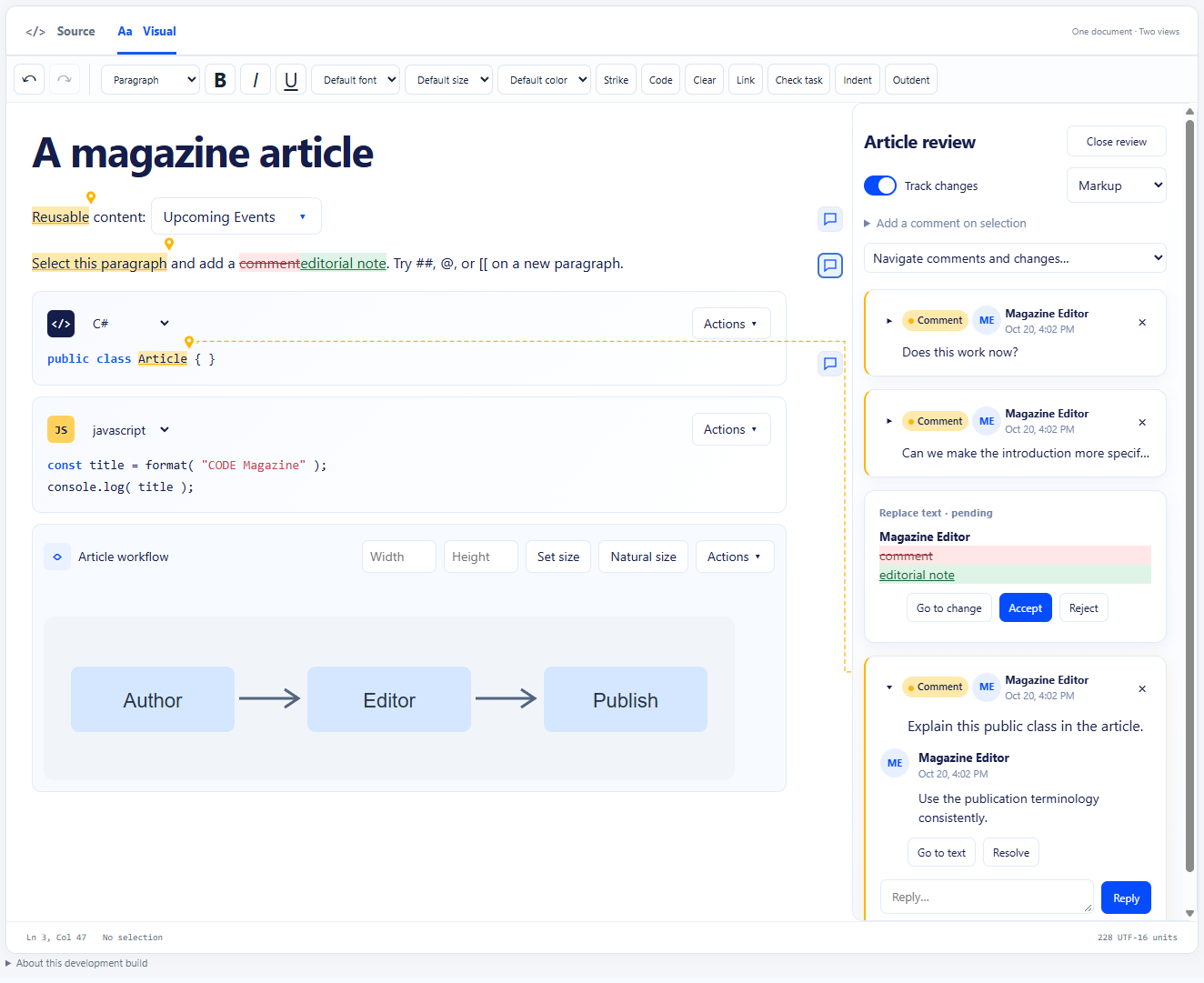
The default theme follows the reference editorial design: navy text, bright blue actions, pale bordered code/image cards, rounded review cards with author initials/timestamps in their headers, toggle-style tracking and compact reply rows. Comments share a yellow highlight, anchor pin and card accent. Browser/ASP.NET and WinForms share the same styles. The Editor UI theme selector in the browser demo and UI theme button in WinForms demonstrate default, plum and dark variants. The two-editor showcase demonstrates independent themes on the same page; the ASP.NET distribution serves it at /themes.html.
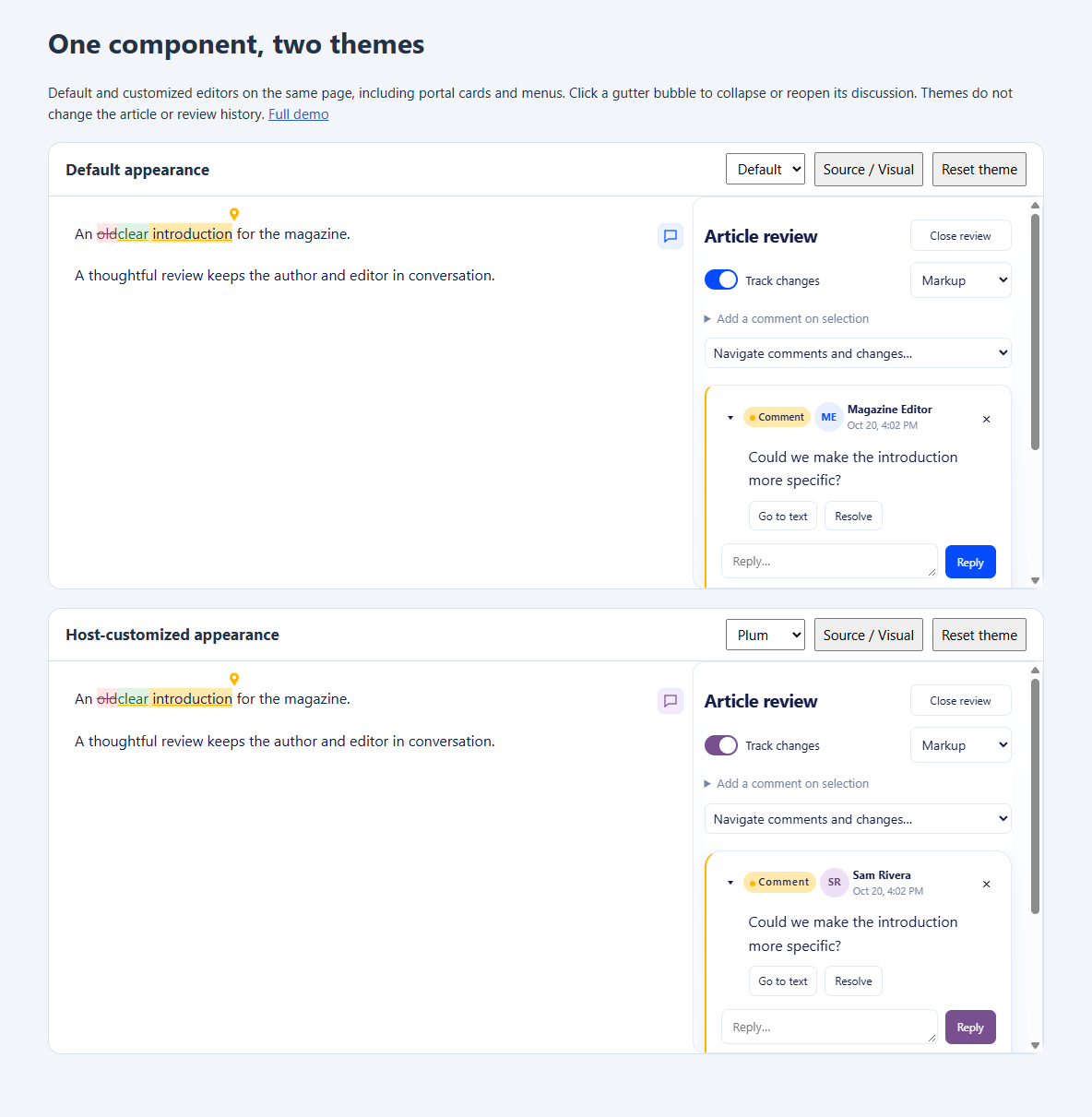
Three different kinds of styling
| Kind | API | Saved with article? |
|---|---|---|
| Component UI: cards, buttons, menus, chips, highlights, markers and editor display | setUITheme, uiTheme, CSS hooks below |
No |
| Article formatting: bold, fonts/colors explicitly applied to content, image dimensions | Formatting/image model commands and storage policy | Yes |
| Isolated preview appearance | previewCss / WinForms PreviewCss |
No |
Changing a UI theme or expanding a comment does not create document revisions, undo entries or review proposals. Save/load the theme in application settings if desired; it is not part of the article/review package. Display font overrides do not become stored text marks. A preview iframe has its own document and does not inherit UI theme CSS.
Browser and ASP.NET API
Load all styles/scripts from assets.json (or use the generated browser distribution). The final default stylesheet is ui-theme.css; the theme controller is ui-theme.js, loaded before editor.js. No framework, font service or icon library is required. A bare CODEEditor.create(element, options) acquires its own component scope; a surrounding .code-editor wrapper is optional for a bare editing surface. For a combined editor/preview layout, follow the constrained workspace example in the web quick start.
const plum = {
  palette: 'light',
  variables: {
    '--ce-ui-accent': '#78508f',
    '--ce-ui-accent-soft': '#f3eafb',
    '--ce-ui-radius': '16px',
    '--ce-ui-font-family': '"Segoe UI", system-ui, sans-serif'
  },
  css: `
    .ce-comment { border-radius: 18px; }
    .ce-review-author { font-weight: 700; }
    :scope[data-ce-part="review"] { border-left-width: 2px; }
  `
};
const editor = CODEEditor.create(document.querySelector('#article'), {
  value: 'An article to review.', mode: 'rich', uiTheme: plum
});
editor.setUITheme({ palette: 'dark' });
editor.setUITheme(plum);
const current = editor.getUITheme(); // independent copy
editor.setUITheme(); // restore default variables/CSS and automatic palette
Each setUITheme replaces the previous theme; it does not merge. configure({ uiTheme: theme }) also works. palette is auto, light or dark. Automatic mode follows a configured editor theme setting, otherwise the system color-scheme preference. WinForms supplies Options.Theme (Light by default), so automatic UI palettes follow that property. Defaults inherit the host UI font (captured from the editor's parent); --ce-ui-font-family gives an explicit consistent UI font across the surface and portal roots. Source text retains its monospace font unless separately customized.
variables accepts string values under --ce- names. Use CSS units for dimensions. css is trusted application code, never article text or user-supplied snippets. It supports style rules, @media and @supports; global at-rules such as keyframes/font faces are rejected. Define fonts in your host stylesheet, then select them by variable. CSS and metadata are assigned as text, not HTML.
Scope and override rules
Every editor-owned root has .ce-ui, a unique data-ce-owner, and data-ce-part. Portal roots include the review panel, popovers, extension overlays, gutter comment markers, text-anchor icons and SVG connectors. The theme controller applies variables to every root, including roots created later; custom CSS is wrapped in an editor-specific @scope with a boundary at another editor's root. Two instances can use different themes without styling each other's portals or app controls. Do not hard-code the generated owner ID.
The defaults are in the ce-editor-ui cascade layer. Unlayered host CSS, including uiTheme.css, can override defaults without fighting their specificity. API variables are applied to roots as inline custom properties; ordinary host CSS cannot override those same variable values unless it uses !important. Prefer one source of truth per variable. Reset restores any root variable value present before the API theme was applied.
Inside scoped custom CSS use :scope to style the root itself, for example :scope[data-ce-part="review"]. Use normal descendant selectors for its content, such as .ce-comment. A selector such as .ce-comment reaches cards in the margin and hover discussion; it never reaches another editor's cards.
External stylesheets can use the documented classes/parts too. Keep their selectors restricted to your editor's roots, and include its portals. The API is easier when the component appears in several host locations. After changing external styles that affect geometry, call editor.resize(); API theme changes automatically invalidate review/source-control layout, and font-loading/resize events refresh it too.
Avoid overriding adapter-owned position, measured left/top/width/height, connector path coordinates, data-editor-ui, or the editor's child DOM. Those implement selection and geometry. Use configureReview({ marginWidth }) or --ce-review-margin-width for the review width. An explicit marginWidth takes precedence over the CSS variable. Source gutters remain controlled by lineNumbers; style their appearance rather than hiding structural DOM yourself.
Supported CSS variables
The following names form the public theme contract. New names may be added; existing names/classes/states below should remain compatible within the preview API line. --ce-host-* variables and other renderer internals are private.
| Variables | Controls |
|---|---|
--ce-ui-bg, --ce-ui-subtle |
Main and secondary backgrounds |
--ce-ui-text, --ce-ui-muted, --ce-ui-border |
Text, metadata and borders |
--ce-ui-danger, --ce-ui-danger-bg |
Error messages and failed action previews |
--ce-ui-accent, --ce-ui-accent-soft, --ce-ui-focus |
Actions, selected surfaces and focus |
--ce-ui-font-family, --ce-ui-font-size, --ce-ui-line-height |
UI typography; size defaults to 14px |
--ce-ui-radius, --ce-ui-shadow |
Cards, menus and dialogs |
--ce-ui-control-radius, --ce-ui-control-padding |
Buttons, inputs and selectors |
--ce-ui-card-padding, --ce-ui-panel-padding |
Review-card/panel spacing |
--ce-ui-avatar-bg, --ce-ui-avatar-text |
Initials badges |
--ce-comment-bg, --ce-comment-color |
Inline comment highlight and accent |
--ce-comment-marker-size, --ce-comment-icon-size |
Gutter button hit area and icon size; marker defaults to 28px/40px for coarse pointers |
--ce-connector-color, --ce-connector-width |
Connector appearance |
--ce-insertion-bg, --ce-insertion-color, --ce-deletion-bg, --ce-deletion-color |
Tracked-change decoration |
--ce-review-margin-width, --ce-popover-width |
Margin width (380px) and hover discussion width (340px) |
--ce-menu-min-width, --ce-menu-max-width |
Suggestion/action menu widths |
--ce-surface-bg, --ce-surface-text, --ce-surface-padding, --ce-surface-padding-block, --ce-surface-line-height |
Editor display; these do not change article marks |
--ce-source-font-family, --ce-source-font-size, --ce-source-line-height, --ce-source-padding-start |
Literal Source display and numbered-gutter padding |
Set coherent color pairs when customizing an accent/background. Light/dark defaults, visible keyboard focus and Windows forced-color support are included. Reduced-motion mode disables component animation/smooth scrolling. Respect hit-target sizes and readable contrast in custom CSS; arbitrary host overrides can undo those properties. Test the actual assistive technology and touch devices you support.
Supported parts, classes and states
Root data-ce-part / component |
Supported selectors |
|---|---|
surface |
.editing-surface, .source, .rich, .nowrap, .no-line-numbers, [aria-readonly] |
review |
.ce-review-panel, .ce-review-margin, .ce-review-header, .ce-review-navigation, .ce-review-cards, .ce-review-status |
| Cards | .ce-comment, .ce-change, .ce-review-active, [data-review-id], [data-state] (open/resolved/detached or proposal status), [hidden] |
| Conversations | .ce-review-card-heading, .ce-review-kind, .ce-review-quote, .ce-review-message, .ce-review-avatar, .ce-review-author, .ce-review-time, .ce-review-actions, .ce-review-reply, .ce-reply-submit |
| Shared controls | .ce-primary, .ce-icon-button, .ce-review-close, :hover, :focus-visible, :disabled, [aria-selected] |
comment-popover, original |
.ce-comment-popover, .ce-original-view |
comment-markers, comment-chooser |
.ce-comment-markers, .ce-comment-marker, .ce-comment-count, .ce-comment-chooser, [aria-expanded] |
comment-anchor-icons |
.ce-comment-anchor-icons, .ce-comment-anchor-icon, [data-placement="anchor"], [data-placement="below"], [data-placement="gutter"] |
connectors |
.ce-review-connectors path, [data-route="whitespace"], [data-route="gutter"], .ce-review-active |
| Inline annotations | .ce-comment-anchor, .ce-comment-point, .ce-insertion, .ce-deletion |
extensions |
.ce-extension-ui, .ce-suggestions, [role="option"], .ce-context-menu, .ce-action-preview, [data-state="running"], [data-state="preview"], [data-state="error"] |
| Embedded controls | .ce-chip, .ce-context-toolbar, .ce-source-toolbar |
| Images | .ce-image-selected, .ce-drop-before, .ce-drop-after, [data-resize-image] |
gutter, preview-divider |
.ce-preview-divider, [role="separator"], :focus-visible |
search (WinForms) |
.search-row, form control selectors; browser hosts provide their own search UI |
Bubble icons are inline SVG using currentColor, with no external asset dependency. Change their color/size through variables or .ce-comment-marker svg; an application can hide that SVG and provide its own ::before content/mask through scoped CSS. Keep the button's accessible name and hit target. Do not remove its semantic button or alter its logical-ID attributes. Author badges use initials; no avatar/identity service is required.
Comment expansion and connectors
Click a gutter bubble to collapse/reopen its thread. Several threads can be open independently. Nearby/overlapping markers combine into a numbered bubble; its menu identifies each discussion and supports arrow keys, Enter/Space and Escape. Individual buttons expose aria-expanded/aria-controls; a grouped button exposes a menu. Closing a card returns focus to the marker when needed, preserves the caret and unsent reply draft, and hides that thread's connector. Closing every discussion releases the wide margin when no pending changes/management panel require it; the narrow marker strip remains. Comment icons appear for anchored, unresolved comments even before the review pane is opened. Close review hides the pane and connectors, keeping only the narrow icon strip; clicking an icon reopens its discussion. Documents without anchored comments reserve no icon strip. Hosts can explicitly hide icons with commentMarkers: false. Review opens management controls again.
editor.configureReview({ singleOpen: false, commentMarkers: true });
editor.setCommentExpanded(threadId, false);
editor.toggleComment(threadId);
const state = editor.getCommentPresentation(); // [{ id, expanded }]
editor.on(event => {
  if (event.type === 'commentPresentationChange') {
    console.log(event.id, event.expanded);
  }
});
singleOpen: true closes other threads when a discussion is opened. commentMarkers: false hides gutter buttons and text-anchor icons without resolving threads. Expansion is ephemeral per-document UI state: Source/Visual switches retain it; loading a different document resets it. It is independent of resolution, tracking and the saved sidecar. Inline hover/focus discussions remain available when the review pane is closed; when it is open, hovering the anchor emphasizes its connector instead. Resolved/detached threads are accessible through review navigation; detached comments cannot be given a text-position marker until reattached.
Anchor pins and gutter bubbles remain visible for loaded, unresolved anchored comments even when review is closed. An anchor pin opens its discussion; the larger gutter bubble also provides the existing thread/group toggles. Pins sit above or below the end of the selected glyphs where geometry permits, otherwise in the clear lane beside the text. Code syntax token boxes do not replace the selected word geometry. They are overlays outside the editable document and never enter saved Markdown, selection text or clipboard data.
A dashed connector appears only while its card (including a reply field), anchored text, pin or gutter icon is hovered/focused. Leaving both hover and focus removes the line, even if that card was previously selected. The review margin must be visible; closed/offscreen cards have no line. Connectors start at the anchor pin, find a clear interline gap around text and contextual controls, and use a gutter lane to reach the actual card edge. Routes are checked against visible glyph rectangles and embedded UI. Tight spacing, missing geometry or an obstructed route uses a short gutter-only connector with the matching bubble instead. Paths are clipped to the editor bounds. No connector crosses article text; cards remain readable if several need to stack. Only candidate anchors near the visible model range are measured; route checks do not lay out the full offscreen article.
WinForms
editor.Options.UITheme = new(
    Palette: "light",
    Variables: new() {
        ["--ce-ui-accent"] = "#78508f",
        ["--ce-ui-accent-soft"] = "#f3eafb",
        ["--ce-ui-radius"] = "16px"
    },
    Css: ".ce-comment { border-radius:18px; }");
await editor.SetUIThemeAsync(new(Palette: "dark"));
EditorUITheme current = await editor.GetUIThemeAsync();
await editor.SetUIThemeAsync(); // reset
await editor.ConfigureReviewAsync(new(SingleOpen: false, CommentMarkers: true));
await editor.SetCommentExpandedAsync(threadId, false);
await editor.ToggleCommentAsync(threadId);
CommentPresentation[] expanded = await editor.GetCommentPresentationAsync();
editor.CommentPresentationChanged += (_, args) => { /* args.Data: id, expanded */ };
editor.UIThemeChanged += (_, _) => { /* host UI can reflect the selected theme */ };
Call control methods on the WinForms UI thread. Options.UITheme can be set before initialization; replace the record to trigger updates instead of mutating its dictionary in place. SetUIThemeAsync validates/applies the theme and records it in options only after success; await it to catch CSS errors while retaining the previous theme. The theme also reaches the native Find/Replace overlay. Use Css for trusted stylesheet text loaded by the application (for example await File.ReadAllTextAsync(themePath)); there is no need to unpack/edit embedded assets. PreviewCss remains separate. No hand-written partial classes or host services are required.
Verification
review-ui.test.cjs checks connector routing, fallback, presentation-state isolation and theme validation. review-ui-browser-checks.html covers both views, bubbles, grouping, keyboard navigation, reply drafts, safe connector geometry, two-instance portal isolation, palette/reset, disposal and bare defaults. The package-only consumer checks typed APIs, notifications, Source geometry and native search theming. Rendered screenshots demonstrate the defaults and a customized theme. Synthetic browser dispatch is not a substitute for real screen-reader/mobile-device acceptance.
Review cards and the navigation list follow their anchors in document order, regardless of creation time or which discussion is active. Equal-position threads retain their existing relative order. Article-level and detached discussions follow anchored items. This ordering applies to Source, Visual and the narrow panel fallback.
Each discussion has a tree-style disclosure arrow to the left of its title and two separate header controls: the disclosure arrow collapses its body, replies and reply composer into a compact header with an ellipsized, single-line comment summary beneath its title; × Close comment hides the entire card. The gutter icon reopens a closed comment. Collapsing retains unsent reply drafts and document order; its connector remains eligible while the compact header has hover/focus. These are temporary presentation choices, excluded from saved review data. Style compact cards with [data-collapsed="true"], .ce-comment-summary, .ce-comment-collapse, .ce-comment-close and .ce-comment-body. Existing setCommentExpanded(id, false) continues to hide the entire card.
The review list includes offscreen discussions and scrolls independently from the editor, with a sticky header. Clicking a card reveals its text; opening a discussion from its icon brings its card into view. Editor scrolling does not reposition the cards. Only visible anchors need geometry measurement.
Review panes reserve a stable scrollbar gutter and right-side breathing room. Customize that inset with --ce-review-edge-padding (default 18px). The compact preview occupies a second row beneath the title.
UI wording (including the Comment title) is configured separately through uiStrings / WinForms Options.UIStrings; see UI wording and localization. Comment icons and count badges are inset from the editor client edge, leaving its scrollbar unobstructed.
--ce-comment-marker-inset controls the inset from the usable client edge when the review margin is absent (default 24px, minimum 8px). The default also leaves clearance for overlay scrollbars whose width is not exposed in client metrics. Count badges remain inside that clearance.
Shared comment appearance
All comments use the same accent family; no author/thread-specific colors are assigned. Set --ce-comment-color for anchor pins and card borders, and --ce-comment-bg for text highlights and badges. --ce-connector-color defaults to var(--ce-comment-color) and can be overridden independently. For example:
editor.setUITheme({ variables: {
  "--ce-comment-color": "#d39800",
  "--ce-comment-bg": "#fff0b5"
}});
Card header styling hooks include .ce-review-metadata, .ce-review-first-message and .ce-review-compose. Contextual toolbars expose .ce-context-symbol, .ce-context-caption and [data-context-kind]. Author metadata, code language selection and image sizing retain their existing actions; the redesign does not add review tabs, sharing, reactions or new editing commands.