
Accounts and browser components
Authentication and person identity
This application uses its person-service integration and ASP.NET Core cookie authentication. It does not use scaffolded ASP.NET Identity storage. AccountController.ValidateLogOn calls the person service, builds claims, and signs in; logout removes the cookie authentication session. Keep the existing identifier/person-ID conventions when modifying claims.
Program.cs names the authentication cookie CODE, configures a 30-minute lifetime with sliding expiration, and sets /Account/LogIn as the login path. It also configures strict minimum SameSite policy and a separate in-memory session with a 30-minute idle timeout. Authentication and session serve different purposes; UTM session data is not proof of identity.
IdentityHelper.GetIdentity maps claims to AppIdentity/UserInformation and can enrich person information through IPersonService. The external identifier and internal Thessaly PersonId are different concepts. CodeController.GetCurrentUserId() returns the internal person GUID; GetCurrentUserEmail() returns the mapped email. Identity information is cached, so inspect invalidation when changing profile or login behavior.
My CODE pages and API
MyCodeController has [Authorize]. /My redirects to GeneralInfo; the controller also supplies subscription, magazine, invoice, fulfillment, and event pages. GeneralInfo.cshtml mounts separate Vue applications for profile image, personal information, password, emails, addresses, social media, subscriptions, interests, and skills.
MyApiController is an [ApiController] under /api/my. It has no controller-wide [Authorize] attribute. Do not assume the authorized Razor page protects API calls: inspect authentication, current-person derivation, ownership, validation, and antiforgery for each endpoint. This is an implementation map, not a security certification.
| Endpoint group | Examples |
|---|---|
| Session | logonasync, logoutasync, getidentity, antiforgerytoken |
| Credentials | changepassword, getpasswordrequirements |
| Profile | getuserdetails, savepersonalinfo |
getemails, saveemail, deleteemail |
|
| Social links | getsocialmedia, savesocialmedia, deletesocialmedia |
| Addresses | getaddresses, getstatesandcountries, saveaddress, deleteaddress |
| Preferences | getemailsubscriptions, saveemailsubscription, interests and skills endpoints |
All names above are relative to /api/my; check action attributes for HTTP methods and body contracts before calling them.
Vue modules and fetch behavior
The layout loads the Vue 3 global build with environment-specific variants. Components are ordinary ES modules using Composition API and template strings under wwwroot/app, not bundled .vue files. Mount points and imports are in the Razor view. Reuse the library components and localization helpers.
app/service/coreService.js uses the current origin, normalizes leading slashes, recursively converts request property initials to uppercase, and parses JSON responses. It expects success and failureInformation, raising dispatchToast on failure. GET network failures resolve a failure object; POST network failures reject. Loading/error code must account for this difference. Do not change response casing or rejection behavior without checking consumers.
The generic POST helper sends JSON but does not automatically attach an antiforgery token. Verify the actual endpoint and request path rather than assuming comments or form protection apply to every AJAX call.
AJAX login and antiforgery
An anonymous form token can become stale after AJAX login. /api/my/antiforgerytoken calls GetAndStoreTokens for the current identity and returns a fresh request token. The existing login/form flow must refresh __RequestVerificationToken before subsequent protected form submissions. Diagnose token errors by checking the identity transition and network payload; do not solve expected behavior by requiring special debugger configuration.
Validate server-side rules as well as client feedback. Test signed-out requests, invalid inputs, expired sessions, denied ownership, failed service responses, and successful save/reload using appropriate test accounts.
Running-site screenshot
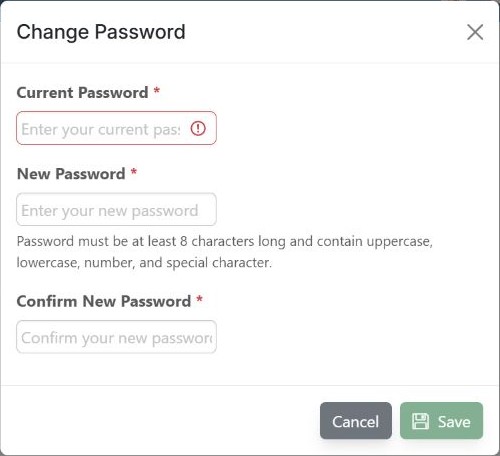
Captured November 4, 2026, from the running local application at https://localhost:7047/My/GeneralInfo, with SiteMode=Magazine, StyleMode=2027, and the Development launch profile. The user signed in and the Change Password dialog was opened. The browser viewport was 705 × 922 CSS pixels; this image is a 500 × 456 pixel crop containing only the dialog, excluding the personal information behind it.
The screenshot shows empty fields, the rendered password requirements, an empty-field validation indicator, and Cancel/Save controls. No password was entered and Save was not clicked. This documents the interface, not a successful password change or validation of the complete password policy. The profile overview and other account records are intentionally excluded from this capture.