
Operations, testing, and troubleshooting
Overview · Build and release · Architecture · Olympus integration
Startup errors and evidence
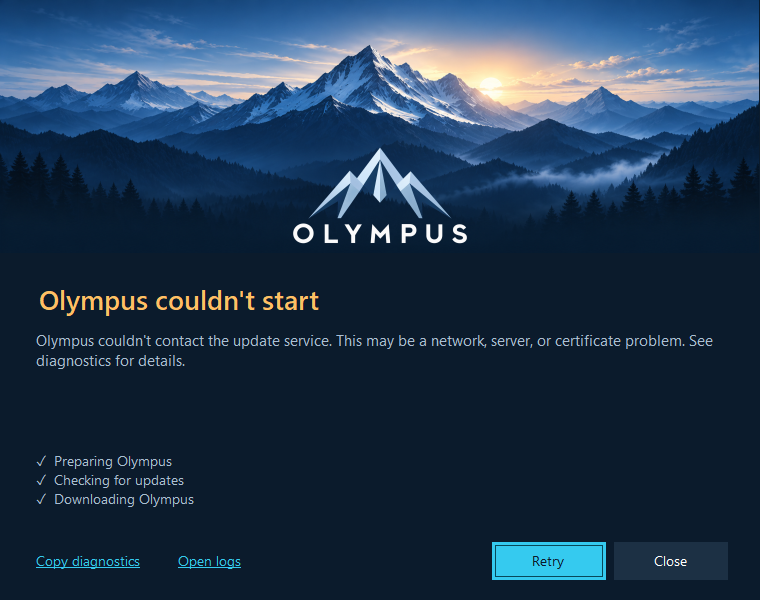
The real WinForms form rendered with a simulated transport failure for documentation. This is an example of error presentation, not evidence of a live network outage.
Ask the user to record the displayed stage/message and use Copy diagnostics. Open logs opens deployment logs beneath %LocalAppData%\Olympus\Logs. Daily files are named deployment-YYYYMMDD.log using UTC; entries contain UTC timestamps. Setup uses separate Burn logs under %TEMP%\Olympus_*.log and may also produce package-specific logs.
Collect the relevant time window, OS/CPU, bootstrap version, active/pending application versions, and whether another Olympus or agent process was running. Preserve deployment.json, startup-failures.json, and relevant receipts when investigating state/integrity issues. Review logs for sensitive application arguments or URLs before sharing them outside the approved support audience.
Common symptoms
| Symptom | Meaning and next action |
|---|---|
| White rectangle/black text on a setup label | A WiX text control is missing its own FontId. Labels do not inherit the window font. Explicit dark styles were added to every setup label; rebuild and inspect the native EXE, not just a render. |
| C++/linker failure while publishing agent | Native AOT needs target-specific C++ tools/Windows SDK. Install them or explicitly use -AgentMode Managed for a managed release/test build. No silent fallback occurs. |
| WiX project says payload files are missing | Building that project alone does not publish launcher/agent. Run Build-Installer.ps1 with the intended version/CPU. |
| Setup EXE cannot be overwritten or output access is denied | Close preview windows and stop debugging the setup. Verify which process owns the actual output/intermediate file; do not kill an unrelated running Olympus application. Retry once the build output is free. |
| WiX ICE validation cannot access Windows Installer | The build environment/service access is unsuitable, commonly a restricted sandbox. Use an ordinary permitted Windows build environment; do not disable validation broadly. |
| First launch cannot contact the update service | There is no local application payload to use yet. Inspect HTTP/TLS/DNS/server/package details; the wording does not prove that the computer has no internet access. |
| An installed version starts after an update check fails | Expected when the installed payload is verified, compatible, and allowed by the accepted minimum floor. The launch log identifies fallback to installed content. |
| No new update appears while Olympus remains open | The agent stages a pending release; activation waits until managed Olympus processes in all sessions stop. Opening a second shortcut normally forwards to the existing primary. Inspect pending, logs, and IPC behavior. |
| Launcher/agent needs an update | The application's metadata requires a newer bootstrap version. Install the approved newer setup; changing application ZIPs does not self-update the bootstrap tools. |
| Waiting for another installation operation | Another deployment process may own installation.lock. Identify the owner and its operation. Network package transfer is outside this lock, but extraction/state/startup work holds it. |
| IOException breaks in Visual Studio at lock acquisition | A thrown sharing/lock violation can be handled contention. Continue execution and inspect status/logs. Only sharing/lock violations are retried; other I/O failures should surface rather than wait indefinitely. |
installation.lock still exists after exit |
Normal. Ownership is the exclusive file handle. The file's existence is not proof that a live process owns it. |
| Installed-file verification fails | Inspect missing/changed/extra files, links, receipt and package hash. Application settings/logs written beside the versioned EXE are a likely integration problem. Do not re-hash untrusted contents just to make them appear valid. |
| A release is blocked after startup failures | Three consecutive confirmed early nonzero exits reached the threshold. Inspect actual crash evidence and bootstrap/runtime prerequisites; one failed attempt alone does not permanently block a release. |
| Splash lingers without a main window | A genuinely windowless process uses the ten-second fallback. A detected main window should finish immediately. Verify the actual process/window architecture and startup path. |
| Duplicate taskbar icons or a pin opens an old EXE | Verify that real Olympus sets EPS.Olympus before UI and that shortcut/relaunch metadata target the stable launcher. Remove/recreate obsolete pins only through a deliberate user/support action. |
| URL/document request is not forwarded | A managed Olympus process exists but IPC is missing, declined, or timed out. The launcher avoids duplicates; implement/diagnose the application listener rather than opening another instance. |
| Critical update does not close Olympus automatically | Expected. Save/deferral/restart UI belongs to Olympus; neither the agent nor a deadline authorizes forced termination. |
The launch operation has a 16-minute outer budget; the update cycle is limited separately to 15 minutes and foreground manifest I/O to five seconds. These are bounds, not promised waiting times for every error.
Repair and uninstall
Use the installed setup's maintenance options or the approved Windows installed-app flow. Repair owns the two bootstrap binaries and registrations. It is not a general application data/state reconstruction tool. Uninstall removes bootstrap files, the Start menu shortcut, protocol registration, and agent logon registration. It removes owned folders only when empty and preserves application versions, data, logs, and deployment state.
Reinstall uses the same root and retained state. A corrupted state file or an application below its accepted minimum may therefore need a reviewed recovery plan; uninstall/reinstall does not intentionally erase policy or data. Same-version duplicate MSI products and downgrades are blocked. Use a newer bootstrap release or the supported uninstall/reinstall path when switching CPU variants.
If an installation preview fails because Windows Installer cannot open the per-user package-cache path, collect the Burn and package logs and reproduce in a clean normal test account. A prior preview encountered 0x80070003 before copying the launcher; its cause was not established. Passing MSI-table checks does not resolve that installed-machine question.
Manual agent startup registration
The MSI declares and owns the HKCU Run value. Use the agent's manual commands only for explicit non-MSI provisioning/diagnostics; do not register a second startup mechanism or a development output path alongside the MSI installation.
$agent = Join-Path $env:LOCALAPPDATA 'Olympus\Agent\Olympus.Agent.exe'
$result = Start-Process -FilePath $agent -ArgumentList '--register-startup' -WindowStyle Hidden -Wait -PassThru
if ($result.ExitCode -ne 0) { throw 'Registration failed; inspect deployment logs.' }
--unregister-startup removes the same registration. Either command must be used alone, without --root, --manifest, or --once. They change registration and exit; they do not start or stop the agent. A manually provisioned agent can be started separately without arguments. Startup commands always target the stable installed production path, even if invoked from a development build.
The agent runs until logout/termination and is not a Windows service. Windows startup policy can disable/delay Run entries. There is no continuous crash watchdog; the next sign-in or launcher invocation can start it again.
Local feed and dummy application test
Use an isolated Windows account/session with no production Olympus primary running. An alternate filesystem root does not create an alternate named-pipe identity. These commands assume the C# Release solution was built and the host has the fixture's .NET 10 runtime.
.\scripts\New-TestDeployment.ps1 -Version 2026.10.1

$root = Join-Path $PWD 'artifacts\test-install'
$feed = Join-Path $PWD 'artifacts\test-feed\manifest-2026.10.1.json'
$agent = '.\Olympus.Agent\bin\Release\net10.0-windows\Olympus.Agent.exe'
$launcher = '.\Olympus.Launcher\bin\Release\net10.0-windows\Olympus.Launcher.exe'

& $agent --root $root --manifest $feed --once
& $launcher --root $root --manifest $feed -- 'olympus://document/42' 'argument with spaces'
& $launcher --root $root --manifest $feed -- 'olympus://document/43'
The script refuses an already generated version/output. Use fresh output/version paths for repeated tests. The dummy is not the real application and may use the windowless startup fallback. The default service is not needed when a trusted local manifest is supplied. If the test layout lacks a stable installed/adjacent agent, launcher fallback agent startup is logged as unavailable; run the explicit one-shot command above as needed.
To test an update, generate a higher version, stage it with a one-shot agent while the dummy runs, and confirm pending changes while active stays in use. Close the old dummy safely, invoke the launcher with matching root/feed arguments, and check activation. For offline testing, make that local manifest unavailable after a successful install and confirm a verified allowed local release can start.
For controlled early failures, generate a new dummy package with -FailStartup. Do not corrupt an installed EXE to simulate a startup crash: that tests receipt integrity instead. After successive confirmed failures, inspect failure counts and permitted fallback selection. Never lower the minimum or change the data epoch just to bypass a recovery refusal.
The real-process smoke harness is optional and requires the numeric dummy fixture 2026.10.1 in its default output location:
dotnet run --project tests/Olympus.Deployment.Tests.csproj -c Release --no-build -- --smoke "$PWD"
It starts dummy/agent/launcher processes and keeps test evidence under artifacts. Run it in an isolated account/session. Named pipes can be denied by restricted execution environments even for processes using the same account.
Recovery boundaries
Preserve evidence before changing anything. Have all relevant deployment/application processes stopped before an operator reviews state or staging cleanup. Do not delete lock files as a substitute for identifying their live owner, clear all failure entries blindly, delete deployment.json to evade a minimum floor, or modify generated receipts to bless unknown content.
There is no general supported state-repair CLI. Prefer a corrected higher application release or approved bootstrap repair where applicable. Recovery from corrupt state, incompatible data epochs, or exhausted permitted fallbacks requires an application/service owner to review the receipt, compatibility, data, and minimum-version policy together.
Release acceptance matrix
Run on clean native x64 and ARM64 Windows machines/accounts; record bootstrap/application versions, agent mode, signing status, source revision, and results.
| Scenario | Required observation |
|---|---|
| First setup and first application launch | Current-user files/registrations are correct; signed release metadata is as approved; the first real payload downloads and opens. |
| Setup UI at 100%, 150%, 200% DPI | Correct dark labels, readable wrapping, CODE Group top-right, version bottom-left, keyboard/cancel/diagnostic actions. Review contrast/accessibility separately. |
| Sign out/in | One agent starts without a terminal and checks updates independently of Olympus. |
| Shortcut/protocol/taskbar | Stable target and EPS.Olympus on shortcut and process; URL arguments preserved; pin/relaunch survives an application update. |
| Fresh launch with an installed release | Feed is checked; newer allowed content is downloaded/staged before starting; main-window detection finishes the splash promptly. |
| Existing running instance | Arguments forward once through IPC; no duplicate primary or disruptive foreground update activation. |
| Agent staging while open | Running payload is unchanged; update becomes pending and activates only after all relevant sessions close. |
| Repair | Missing bootstrap EXE and damaged registration are restored; application data remains intact. |
| Bootstrap upgrade with running agent | Updater is stopped/replaced and started after commit; shortcut/Run/protocol registrations remain valid. |
| Failed MSI upgrade/rollback | Prior supported installation/state is recoverable; collect MSI logs and confirm actual rollback behavior. |
| Downgrade/same-version/CPU switch | Policy is enforced without two installers owning conflicting bootstrap files. |
| Uninstall/reinstall | Only owned bootstrap resources are removed; retained application data/state is reused as designed. |
| Offline, TLS/HTTP failure, 304, interrupted transfer | No partially downloaded/staged application is launched; valid offline selection respects the accepted minimum. |
| One/two/three early failures and normal exits | Correct streak and block threshold; safe fallback only within minimum/data constraints; later exits do not revive the splash. |
| Prerequisite/data-epoch mismatch | Clear refusal and manual coordination; no unsafe automatic migration or silent dependency installation. |
| Required/critical update with unsaved work | Prompt acknowledgement, save/deferral/restart flow, repeated critical reminders, no forced termination. |
| Concurrent sessions and crash/power interruption | No active payload mutation or state corruption; all-session activation rule holds under tested conditions. |
Unit checks, compiled MSI validation, and a screenshot each establish different facts. None is a substitute for this installed-machine matrix or real application/service integration.