
Embedded content and editorial review
The browser editor and WinForms control support atomic embedded-content chips, multiple suggestion triggers, contextual host actions, comment threads and tracked editorial changes. The browser and ASP.NET samples share these features; the WinForms sample exposes the same contracts through typed methods and events.
Try the samples
Choose Editorial demo in the browser, ASP.NET or WinForms sample. The article includes an Upcoming Events textblock, a code snippet, an image and an initial editorial comment. Tracking starts enabled.
- Type
##,@or[[in a new paragraph for textblocks, mentions or image attachments. Use Up/Down and Enter/Tab to select, or Escape to dismiss. - Type
##at paragraph start to make Heading 2. The space closes suggestions and normal typing continues. - Use the chip arrow to open its definition. WinForms opens a separate window; the browser opens a definition window when popups are permitted.
- Change the code language or use Actions on code and images. Inspect a returned result before choosing Apply. Cancel stops a pending request.
- Open Review, select text and add comments, reply, resolve/reopen threads, or enable tracking. Choose Proposed, Original or Markup; accept/reject proposals individually, through the selection toolbar, or with Accept All / Reject All in the sidebar.
- Use Save review package / Save review to retain the complete editorial article. Open the
.article.jsonfile to continue the cycle. Browser Keep snapshot also retains review metadata. Publication export returns clean content.
Image treatments and snippet formatting in these samples are deterministic demonstrations. They do not call an AI provider or implement official CODE Magazine production standards. The host supplies its real formatter, brand instructions, AI service, permissions and asset storage.
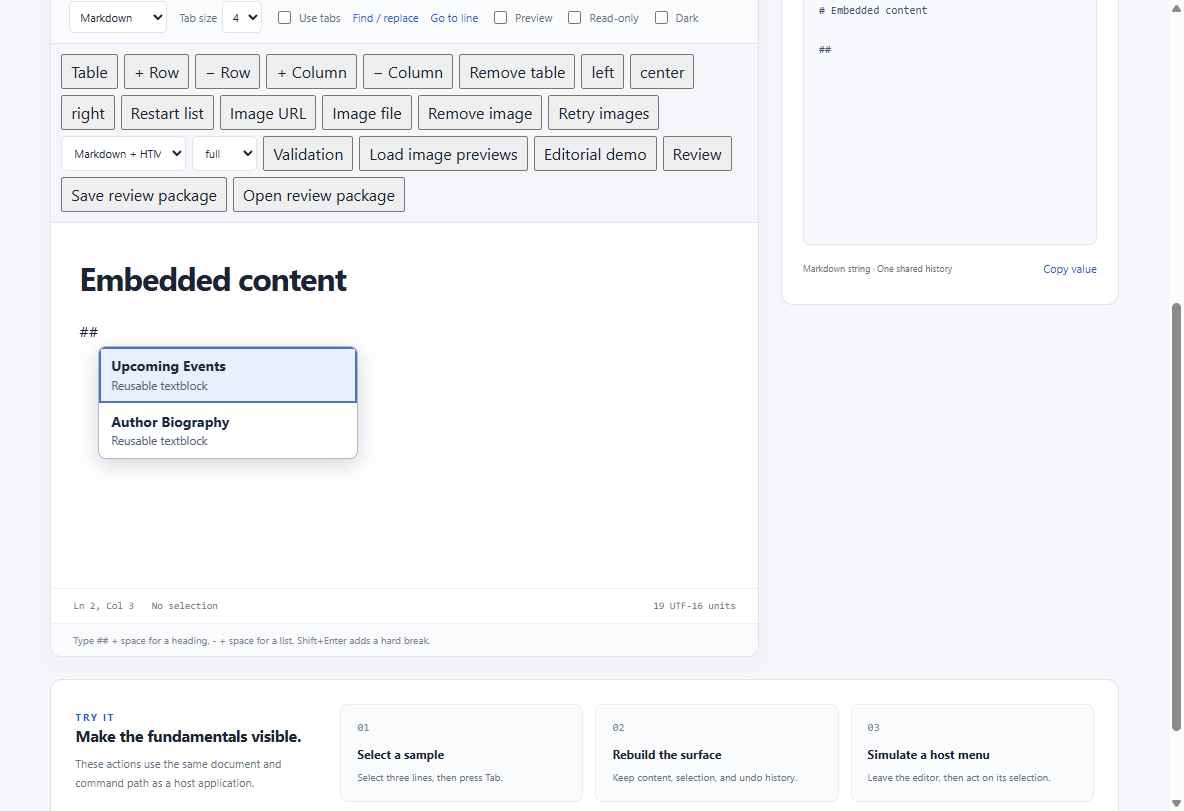
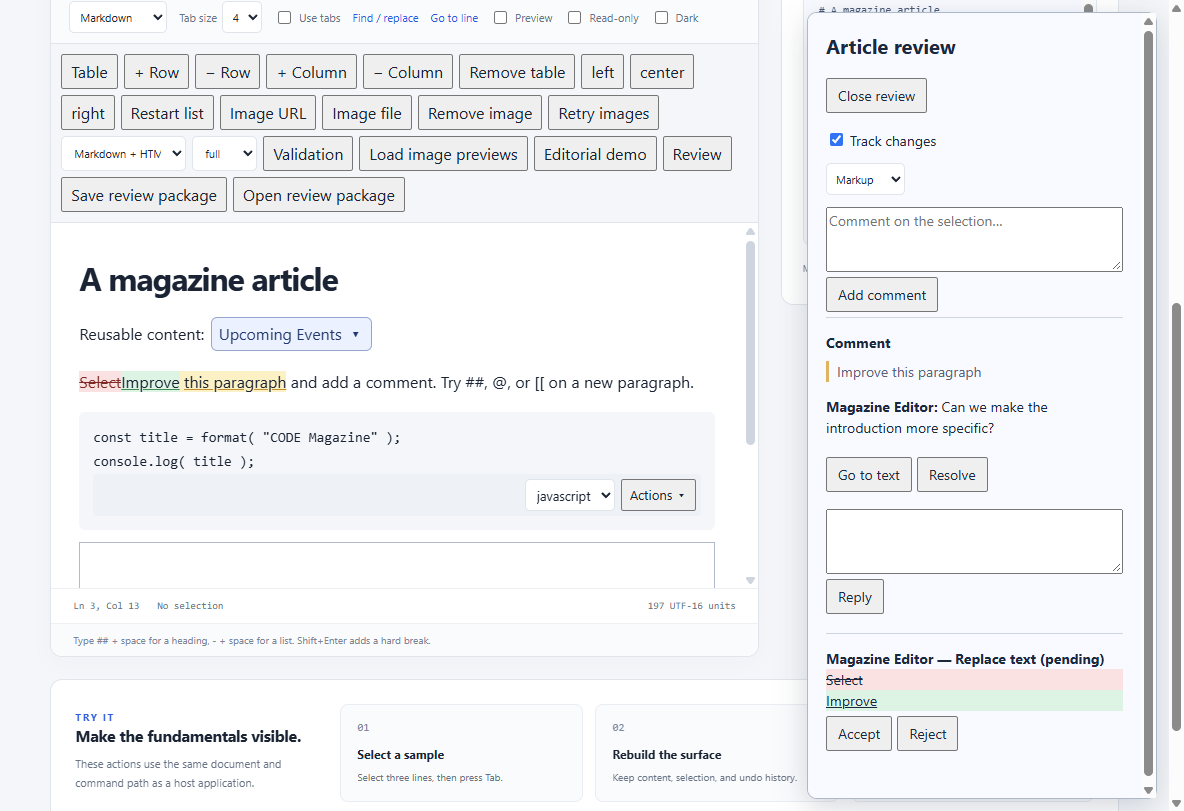
These are actual WebView2 captures of the generated browser sample. The native/browser verification program regenerates them after its rendered checks pass.
Atomic chips
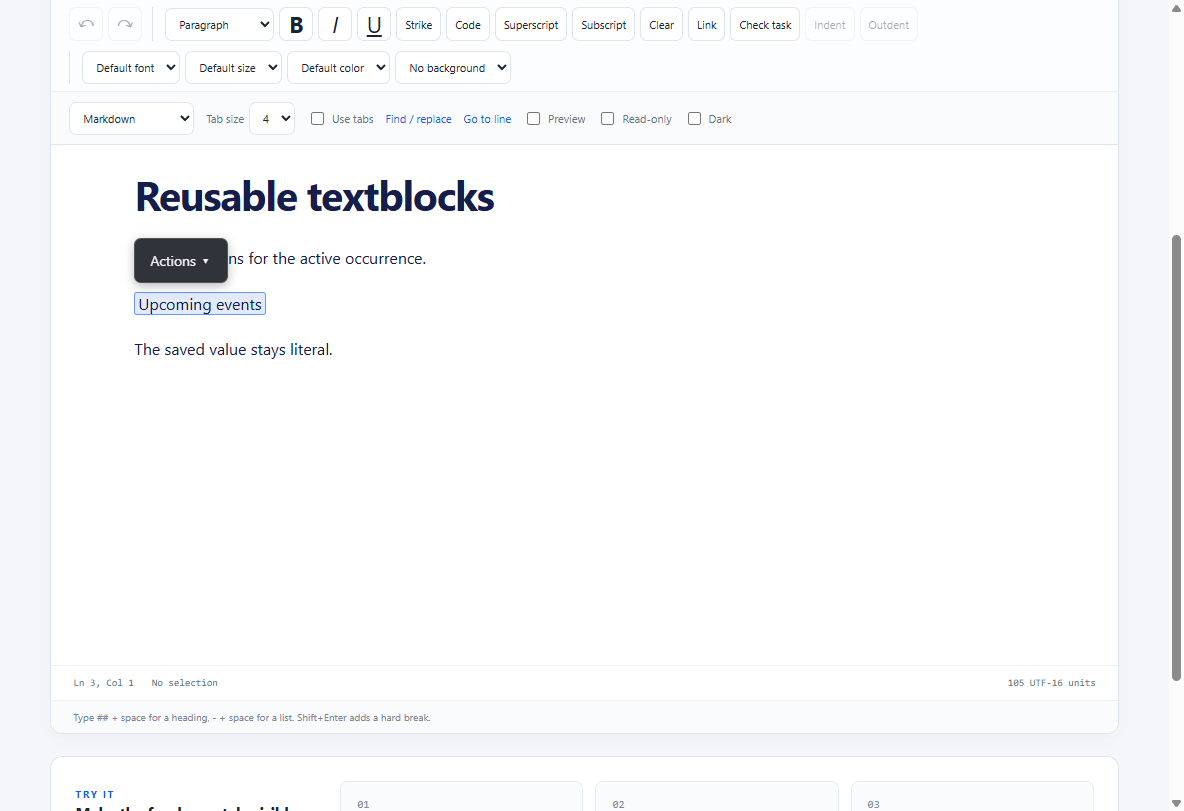
Visual mode displays the registered label in place of the literal token. Compare this with the Source screenshot below: both views represent the same reusable occurrence, and saving keeps the literal value.
editor.registerTokens([
  { id: "eventlist", type: "textblock", value: "##eventlist##", label: "Upcoming Events" }
]);
The stored value remains ##eventlist##; the label is a rendering choice. Recognized tokens are protected atomic ranges in the model and noneditable chips in Visual view. Caret movement cannot enter their text, partial selections expand to the whole token, and Backspace/Delete remove one item. Copy exports the literal value, and undo restores it. Tokens can be recognized in loaded content or as the final delimiter is typed. Source view keeps ordinary literal text. Inline code, fenced code, raw fragments and images do not become chips.
IDs identify the referenced host object; block IDs and occurrence positions identify a particular use in the article. A host may reopen a definition without changing the article. Changing a shared definition belongs to the host's storage workflow and can affect other articles.
Registration replaces the current token catalog. A suggestion inserted as a token adds its definition to that catalog. Catalogs are host configuration, so register them again when reopening an article; unresolved values remain literal text rather than losing content.
Textblock actions and preview
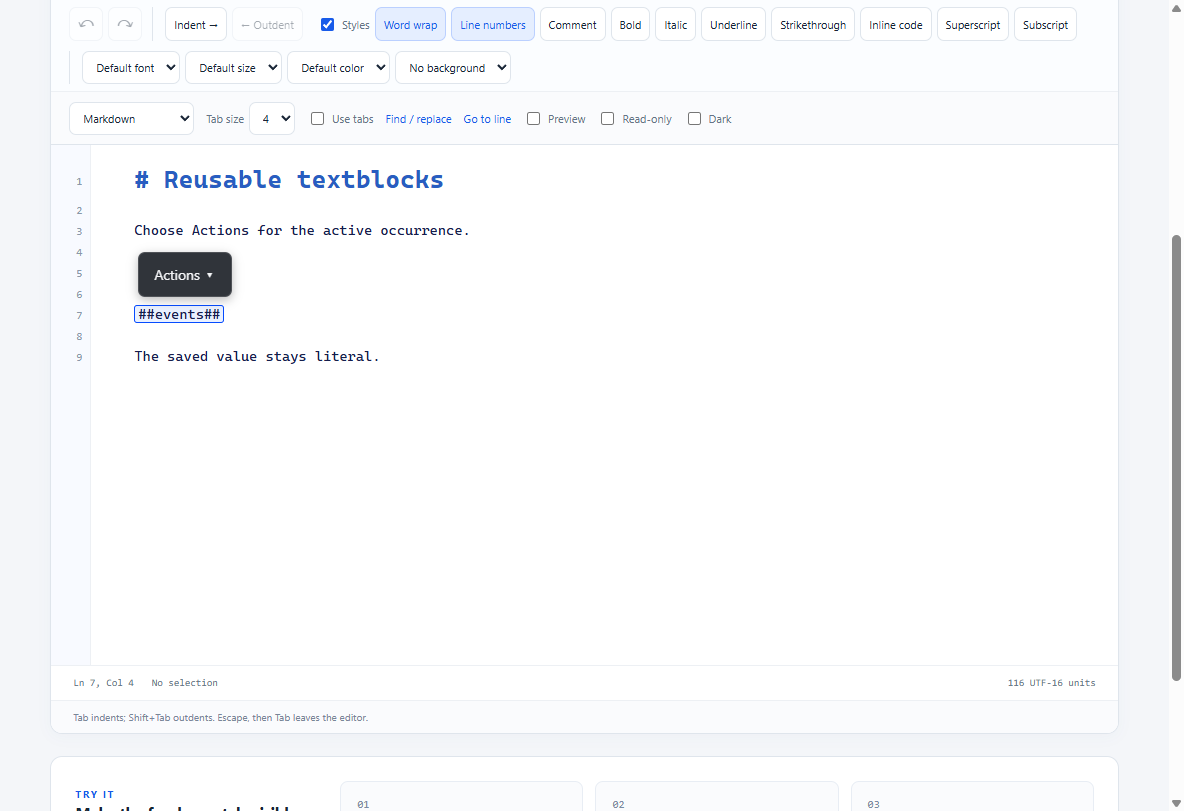
Registered textblocks offer an Actions menu in Source and Visual modes for the active occurrence. Open definition is a host reference action; Delete textblock removes that occurrence in one undoable edit. Set a token's JavaScript canOpenDefinition: false or WinForms EditorToken.CanOpenDefinition: false to hide and reject definition actions for it. Other configured token actions remain available. Source keeps the literal value editable and highlights the active occurrence; Visual treats it as a chip.
Typing ## automatically suggests matching registered token values, unless the host registers its own ## provider. Filtering is case-insensitive and returns at most 200 results. A normal heading typed with a space still uses the Markdown heading rule.
Preview can expand each registered occurrence without changing saved content:
editor.configure({ onTextblockPreviewRequest: async request => {
  if (request.name === '##eventlist##')
    return { handled: true, content: 'Upcoming events supplied by the host' };
} });
The request has name (the literal token value), content, handled, and an abort signal. Return an object or update the request. Unhandled occurrences retain their literal value. Replacement content is rendered as text with the occurrence's existing marks, rather than parsed as Markdown or HTML. Code and preserved fragments are excluded.
editor.TextblockPreviewRequested += (_, e) =>
{
    if (e.Name != "##eventlist##") return;
    e.Content = "Upcoming events supplied by the host";
    e.Handled = true;
};
Set Content/Handled synchronously in this native event; it has no asynchronous Result property. This per-token expansion is separate from whole-document PreviewRequested preprocessing. Textblock colors are display settings: see the appearance reference.
Multiple suggestion providers
editor.configure({
  suggestions: [
    { id: "blocks", providerId: "content", trigger: "##" },
    { id: "mentions", trigger: "@" },
    { id: "attachments", trigger: "[[" }
  ],
  onSuggestions: async request => {
    // request includes registrationId, providerId, trigger, query, from/to,
    // requestId, revision, generation, and an AbortSignal.
    return [{
      id: "eventlist", label: "Upcoming Events",
      displayHtml: "<strong>Upcoming Events</strong><small>Shared textblock</small>",
      insertText: "##eventlist##", insertAs: "token", type: "textblock"
    }];
  }
});
registerSuggestions(registrations) replaces all registrations; unregisterSuggestion(id) removes one at runtime. Each registration has a unique ID, a trigger, optional provider ID, wordBoundary (default true), allowSpaces (false), minQueryLength (0) and maxQueryLength (100). Overlapping triggers prefer the longest match. Multiple triggers may share a provider. Registrations apply in Source and Visual views, with Visual code excluded. Suggestions are suspended during IME composition and for noncollapsed selections.
Hosts may use events instead of the callback: handle suggestionsRequested, then call provideSuggestions(requestId, items). suggestionsCancelled identifies requests that no longer apply. Responses to obsolete revisions/generations are ignored. There are at most 200 results per response. Selecting a suggestion replaces its trigger and query in one undoable edit.
Items support insertAs: "text", "token", or "image". Image items use src and alt: Visual view inserts a structural image; Source view inserts Markdown/HTML image syntax (or the supplied text/URL for plain text). label is the accessible plain-text fallback. HTML snippets accept a safe display subset: strong/bold, emphasis/italic, small, span/div/paragraph, line breaks, code, strike/underline and permitted image thumbnails. Scripts, active elements, event handlers and arbitrary attributes are excluded. Image loading follows the editor's image-origin policy. Use host CSS on the popup container for styling rather than interactive HTML controls inside an option.
Context actions on chips, code and images
editor.configure({
  contextActions: [
    { id: "definition", label: "Open definition", targets: ["token"], scope: "reference" },
    { id: "format", label: "Format snippet", targets: ["code"] },
    { id: "pencil", label: "Create pencil drawing", targets: ["image"] }
  ],
  onContextAction: async request => {
    request.reportProgress("Formatting snippet…");
    const code = await hostFormatter(request.context.code, request.context.language, request.signal);
    return { kind: "replaceCode", code, language: request.context.language };
  }
});
The editor owns toolbar placement, popup keyboard navigation, result preview and undo. codeLanguages configures the code toolbar dropdown; setCodeLanguage(blockId, language) updates the stored fence language in one transaction. Toolbars and menus never become saved document content or clipboard text.
Actions identify a stable block, the current code/language or image metadata, or a token's reference and occurrence. scope defaults to occurrence; use reference for host definition actions. For hosts using events, handle contextActionRequested, update progress with reportContextActionProgress(id, message), and return a result through completeContextAction(id, result).
| Result | Fields | Effect after Apply |
|---|---|---|
| Handled host interaction | handled: true |
No article edit; for example, open a definition window |
| Code replacement | kind: "replaceCode", code, optional language |
Replace snippet in one transaction |
| Image replacement | kind: "replaceImage", src, optional alt |
Retain original asset in undo/review history; replace this occurrence |
| Token replacement | kind: "replaceToken", value |
Replace the occurrence's stored text |
| Failure | error |
Display an error without editing the article |
applyContextAction(id) applies a previewed result; cancelContextAction(id) cancels work and raises contextActionCancelled. Callback requests include an AbortSignal. Late cancelled results are ignored. Apply checks the document generation and target signature; edited/removed targets are never overwritten. Stale results remain visible for inspection. Other unrelated blocks may be edited while work is in progress. An applied replacement is also a tracked proposal when tracking is enabled. Asset deletion is the host's responsibility; replacing an image does not delete its original file.
Comments and tracked changes
Compare the same tracked replacement in the two reading views:
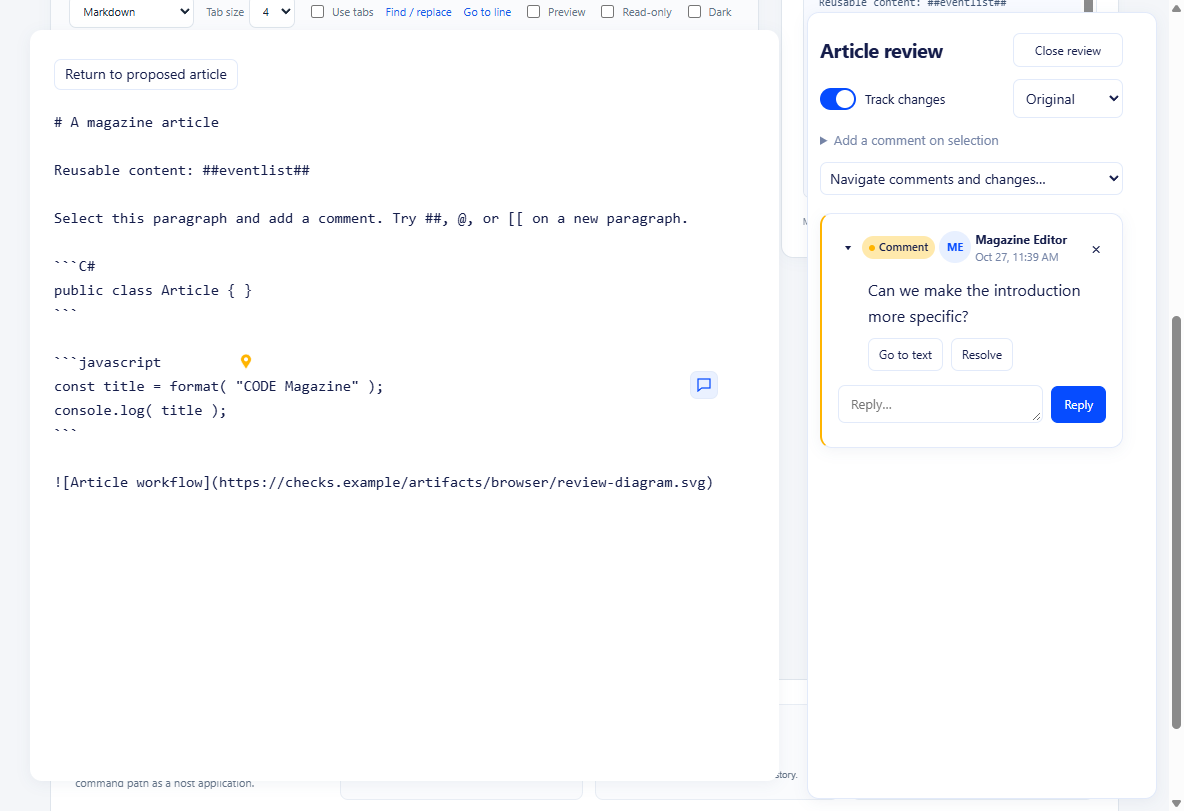
Original shows the content before the proposed edit.
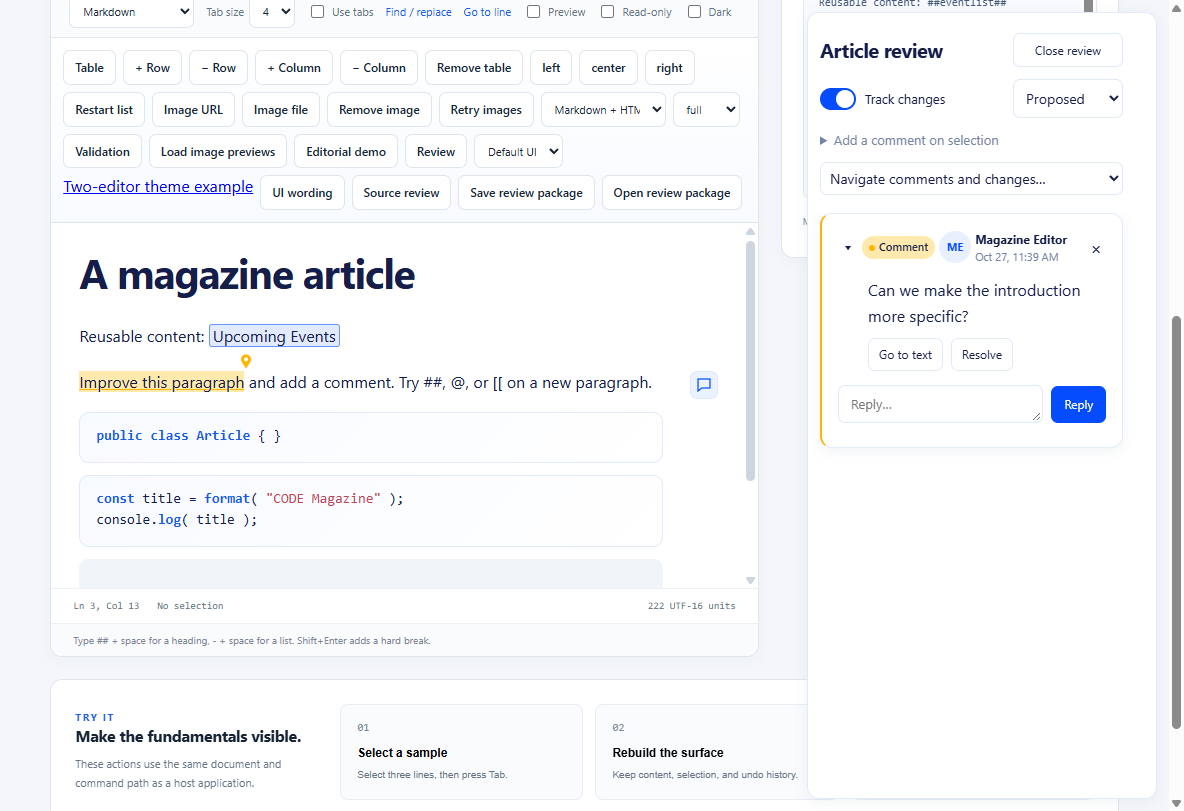
Proposed shows the content with the proposal applied for reading. Switching these views does not accept or reject the change. Use Markup to inspect the change annotations and the review controls to decide its outcome.
editor.configureReview({ author: { id: "editor-1", name: "Magazine Editor" }, tracking: true });
const thread = editor.addComment({ text: "Please expand this explanation.", from: 20, to: 48 });
editor.editComment(thread.id, thread.messages[0].id, "Please expand this explanation and add an example.");
editor.replyToComment(thread.id, "Added an example.");
editor.resolveComment(thread.id, true);
editor.showReview(true);
editor.setReviewView("markup");
Comment options support scope: "range" (default), "block" or "article". Offsets use the editor's current UTF-16 model text, matching the selection API. Visual formatting delimiters are not part of that text; an image occupies one object character and a chip retains its literal value length. A thread stores replies, authors, UTC timestamps, resolution and an anchor containing block identity, range, quotation, surrounding context and revision.
The review header has an Add a comment on selection button. While review is visible or tracking is enabled, a nonempty document selection also offers a floating Add comment toolbar in both views. Opening the composer preserves the selection while you type. Each message and reply has an Edit comment action for its author, with Save and Cancel controls. editComment(threadId, messageId, text) checks the configured author ID, retains message identity and records an edited timestamp. The host supplies author identity; these checks are not authentication.
Document operations map attached comments as text changes. Removing an entire commented passage marks it needsReattachment; review UI never silently jumps it to unrelated text. reattachComment(id, from, to) or Attach to selection reconnects it. Resolving a thread keeps its history. Comments, replies, resolutions and anchor changes participate in undo and dirty state even when publication text is unchanged.
Tracking records proposals with author, timestamp, label, removed/inserted text and a compact canonical publication-content patch. Continuous typing at the same location forms one proposal, including a word typed over a selection. Compatible consecutive input less than 900 ms apart can share a typing group; moving the selection or a pause of 900 ms or longer starts a new group. Earlier proposals shifting position as the document changes do not split the current replacement into character proposals. Immediate Backspace-and-retype corrections amend the pending typing proposal while retaining the usual undo steps. Adjacent deletions by the same author can combine into one proposal in document order even across typing-group boundaries.
Deleting your own pending inserted text cancels the deleted portion rather than recording a second deletion, including after a pause or cursor movement. Removing the entire addition removes its proposal. When a deletion also covers original text, only the original text is proposed as deleted. An insertion with later dependent proposals must retain its dependency history; it is not cancelled through those later edits. Deleting another author's addition retains both proposals. Markup highlights only surviving inserted characters, leaving following unchanged text unmarked.
Transactions that edit separated passages are split at unchanged lines and words; formatting operations retain their paired syntax as one proposal. This covers text edits, formatting, headings/lists/tables, language changes and image replacement. Undo/redo restores both document and corresponding review metadata. Redoing an edit originally made with tracking off creates a proposal when tracking is enabled at redo time; subsequent undo/redo preserves that proposal. Code and image action replacements use the same transaction path.
- Proposed is the current editable article.
- Markup decorates comment anchors and inserted/deleted text in both Source and Visual views, with discussions and proposal details in hover cards and an independently scrollable review margin (or a panel for narrow editors).
- Original is a read-only publication-source projection with pending proposals reversed. It does not replace or save over the proposed article.
acceptChange(id) keeps a proposal; rejectChange(id) reverses it. Separated edits remain independent even inside one paragraph. Dependencies are recorded when an edit changes the content of an earlier pending proposal; accepting that later proposal also accepts its required predecessors. Reject later dependent changes first. This prevents rejecting an earlier replacement from silently destroying later work. The UI reports dependency conflicts. Adjacent insertions remain independent; this is not a simultaneous collaborative merge engine.
In Proposed and Markup views, a nonempty selection that touches pending changes offers Accept changes and Reject changes in the floating selection toolbar. A partial overlap includes the whole proposal; deletion markers inside or at an edge of the selection are included. Both actions cover every included proposal. The controls also work when recording has stopped, the sidebar is closed, or comments are disabled. The toolbar follows the shared object-toolbar styling and remains usable while its buttons have focus.
The sidebar's Accept All and Reject All decide all pending proposals in the article. The buttons are disabled when no pending proposals remain or the document is read-only, and hidden when change tracking is unavailable. In Original view, a sidebar bulk action first returns to Proposed view. Selection actions are hidden in Original view and in read-only documents. Rejection processes the selected proposals newest first. If rejection requires a later dependent proposal outside the selection, the UI reports the conflict before deciding any selected proposal; include the dependent change or review it first. Acceptance keeps the existing prerequisite-acceptance behavior described above. These are built-in UI actions; the host APIs remain acceptChange(id) and rejectChange(id) for individual proposals.
There is a limit of 500 review proposals per article; resolve changes and start a clean editorial revision for longer cycles. The runtime is intended for bounded article-sized documents, not unbounded document histories or simultaneous collaborative editing.
Save Markdown with its companion
const snapshot = editor.getSnapshot();
const article = await editor.getReviewPackage();
// article = { markdown, review }
await host.saveArticleAtomically(article);
editor.markSaved(snapshot.revision, snapshot.sessionId);

await editor.loadReviewPackage(article);
const publicationMarkdown = editor.exportPublication();
New packages contain clean proposed Markdown and a version-2 review sidecar. The sidecar stores a stable documentId, unique save revisionId, SHA-256 contentHash, format/view, comments and proposals. A publication-source baseline supports integrity checks and explicit external reconciliation; a compact blockIds list preserves rich block identity. The loader reconstructs source caches and signatures instead of storing a full model copy for publication-representable states; states such as a blank paragraph after a snippet retain a model fallback for fidelity. Proposals store changed text instead of full paragraph snapshots. Version-1 packages remain loadable; version-2 packages require an updated editor. The same mechanism supports HTML/plain content when the corresponding format is selected; the package's markdown property is the publication-content field for all formats.
Store the package as one .article.json file/database record, or split its two fields into article.md and article.review.json and save them as one revision. The SHA-256 pairing detects mixed revisions; it is an integrity check, not a digital signature or an authorization system. Do not save only getValue() during editorial work. Plain .md remains a valid initial author submission and a clean publication/export format, but cannot carry the review conversation by itself.
getReviewState() returns a copy of live review metadata. reviewChange notifies hosts to refresh review controls. A review package is a committed snapshot; later edits remain dirty and a stale save acknowledgement cannot clear them. Load checks integrity before replacing the current article and rejects concurrent changes during validation.
External Markdown edits
By default, loading a mismatched Markdown/sidecar pair fails. The host must explicitly request reconciliation:
await editor.loadReviewPackage(
  { markdown: externallyEditedMarkdown, review: previousSidecar },
  { reconcile: true, trackExternal: true }
);
Reconciliation tries the comment quotation plus surrounding context, then a unique quotation. Ambiguous/missing passages remain needsReattachment. Previous pending proposals become needsReconciliation and are retained as evidence rather than applied to a different document. With trackExternal, the imported difference becomes a proposal labeled with unverified external authorship. The editor cannot infer who changed a standalone Markdown file. Publication and review storage still belong to the host; this is not a multi-user merge or CRDT system.
WinForms host API
await editor.ConfigureExtensionsAsync(new(
    Tokens: [new("eventlist", "##eventlist##", "Upcoming Events")],
    Suggestions: [new("blocks", "##"), new("mentions", "@")],
    ContextActions: [new("format", "Format snippet", ["code"])]));

editor.SuggestionsRequested += (_, args) =>
    args.Result = LookupSuggestionsAsync(args.Request, args.CancellationToken);

editor.ContextActionRequested += (_, args) =>
    args.Result = FormatOrTransformAsync(args.Request, args.CancellationToken, args.ReportProgress);

await editor.ConfigureReviewAsync(new(new("editor-1", "Magazine Editor"), true));
await editor.AddCommentAsync(new("Please clarify.", From: 20, To: 48));
await editor.ShowReviewAsync();
ReviewPackage article = await editor.GetReviewPackageAsync();
To restore a complete serialized package ({ "markdown": "...", "review": { ... } }), pass the JSON directly:
await editor.LoadReviewPackageAsync(packageJson);
Both the typed package and JSON overloads also have synchronous equivalents:
ReviewPackage article = editor.GetReviewPackage();
editor.LoadReviewPackage(article);
editor.LoadReviewPackage(packageJson);
These synchronous methods finish the operation before returning and process Windows messages while waiting for WebView2. Call them on the owning UI thread, outside editor event handlers and other synchronous review calls. Use the asynchronous methods in editor event handlers; synchronous calls there throw InvalidOperationException to prevent browser callback reentrancy and deadlocks. Both load overloads accept optional ReviewLoadOptions, validate the package integrity, and update the control's document format/view/language options. The JSON overload expects the complete package, including Markdown, rather than only its review object.
ReviewEnabled = true makes review available; it does not start recording changes or open the review pane. ReviewEnabled, CommentsEnabled, and ChangeTrackingEnabled default to true, while recording starts off. After loading an article, set the signed-in author and enable recording explicitly:
await editor.ConfigureReviewAsync(new(
    Author: new("editor-1", "Magazine Editor"),
    Tracking: true));
await editor.ShowReviewAsync();
Showing the pane is optional. Comments can be added without tracking. Loading a review package restores its saved tracking setting and author, so configure the current user after loading. Save the complete package for comment-only edits as well as content changes.
EditorExtensionOptions, EditorToken, SuggestionRegistration, SuggestionItem, ContextAction, ContextActionResult, ReviewAuthor, ReviewOptions, CommentOptions, ReviewPackage and ReviewLoadOptions are public types. Event handlers assign their asynchronous result task; cancellation follows trigger/context lifetime. Host callbacks are asynchronous notifications, so they can invoke editor APIs without waiting on a blocked UI request. Native application storage and windows remain ordinary host code.
Other typed methods include RegisterTokensAsync, RegisterSuggestionsAsync, UnregisterSuggestionAsync, SetContextActionsAsync, SetCodeLanguageAsync, BeginContextActionAsync, ApplyContextActionAsync, CancelContextActionAsync, GetReviewStateAsync, ReplyToCommentAsync, ResolveCommentAsync, ReattachCommentAsync, AcceptChangeAsync, RejectChangeAsync, SetReviewViewAsync, LoadReviewPackageAsync and ExportPublicationAsync. ReviewChanged reports sidecar changes. Use the normal WinForms UI thread for public control methods.
See image objects, Source review and large documents for image gestures, toolbar placement, syntax colors, shared annotation geometry, review margin configuration and measured performance.
Disabling review features
Web creation options and editor.configure accept reviewEnabled, commentsEnabled, and changeTrackingEnabled (all default to true). WinForms exposes matching ReviewEnabled, CommentsEnabled, and ChangeTrackingEnabled properties on TextEditor and Options. The master switch disables both capabilities; the individual switches allow either capability independently.
Disabled capabilities hide their built-in UI and annotations and reject comment or proposal editing APIs. Disabling change tracking also stops recording and returns to Proposed view. Re-enabling requires explicitly restarting tracking. Existing metadata is preserved, and review package loading/export remains available (loading with trackExternal: true requires change tracking to be enabled). Normal document saves require no review sidecar.