
Web quick start
Documentation index · JavaScript API
Browser sample
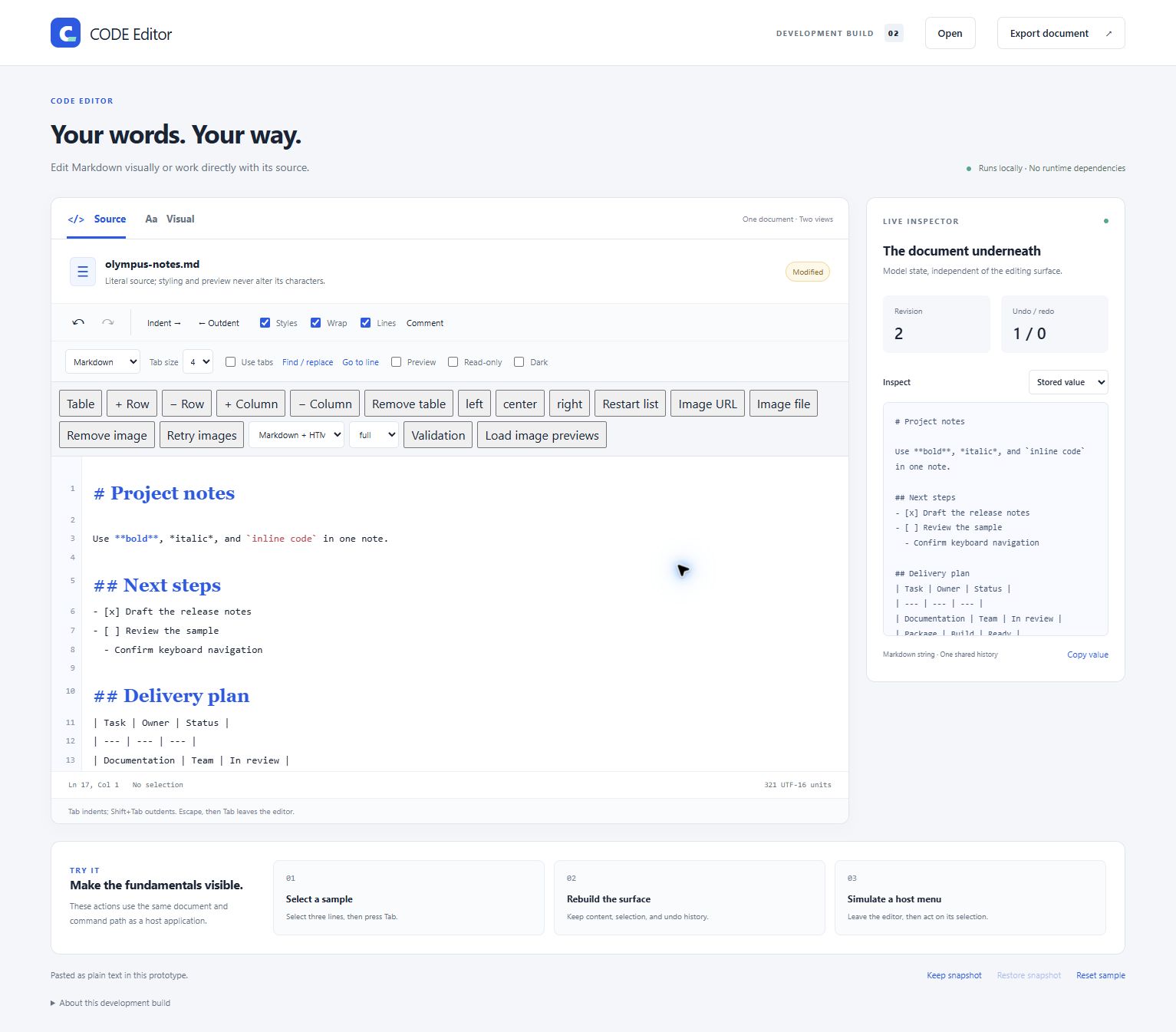
The running browser sample in Edge, using the shared screenshot note. Source mode shows the literal Markdown and line numbers; the live inspector on the right displays the stored document. The header, toolbars, inspector, and experiment buttons belong to the sample application.
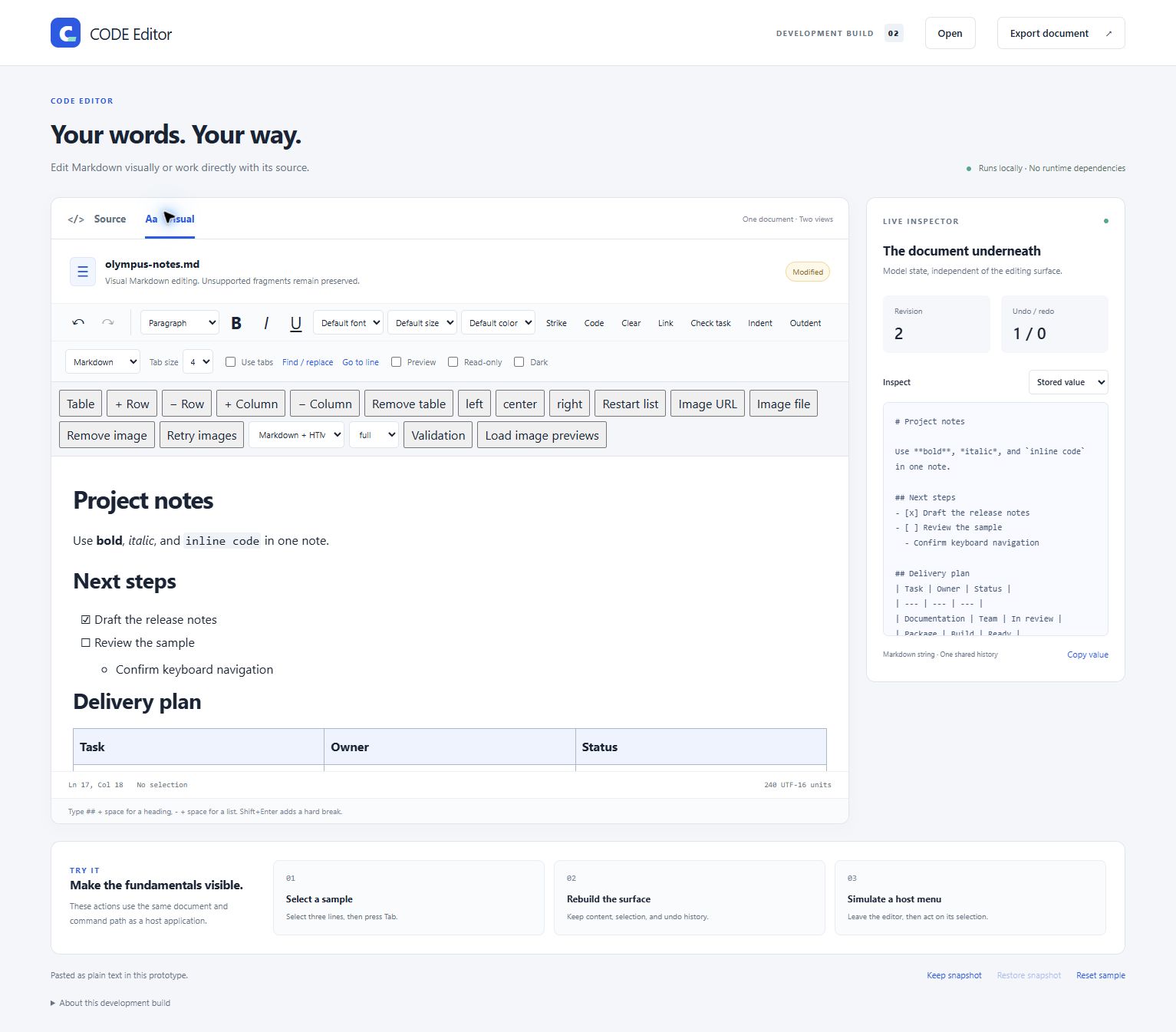
Visual mode provides formatting commands over the same document. The sample keeps the editing surface at a bounded height, so longer content scrolls inside it. See the table screenshot for the lower part of this note, and the screenshot catalog for all browser views and capture instructions.
Run the demo
Run commands from the CODE Editor repository root. Generate the browser distribution with node build/assets.cjs; open artifacts/browser/CODE.Editor.Demo.html for a self-contained demo. For development, serve samples/browser/index.html:
node build/serve.cjs
Visit http://127.0.0.1:8091. The Node helper serves static files; it does not implement the ASP.NET image-upload endpoint. A file:// demo likewise provides no application storage. Rebuild the one-file demo after source changes with node build/assets.cjs.
Complete embedding example
Save the following HTML beside the generated runtime files from artifacts/browser/. The editor pane and preview share a container; the component creates the resize divider. This example uses no demonstration toolbar or draft-storage code.
<!doctype html>
<html lang="en">
<head>
  <meta charset="utf-8">
  <meta name="viewport" content="width=device-width,initial-scale=1">
  <title>CODE Editor example</title>
  <link rel="stylesheet" href="editor.css">
  <link rel="stylesheet" href="features.css">
  <style>
    body { margin: 16px; font-family: system-ui, sans-serif; }
    #workspace { height: 70vh; min-height: 280px; }
    #editor-pane { position: relative; min-width: 0; min-height: 0; }
    #editor { height: 100%; overflow: auto; padding: 20px 20px 20px 52px; }
    #preview { height: 100%; width: 100%; border: 0; }
  </style>
</head>
<body>
  <button id="bold" type="button">Bold</button>
  <div id="workspace" class="code-editor">
    <div id="editor-pane">
      <div id="gutter" aria-hidden="true"></div>
      <div id="editor" class="editing-surface"></div>
    </div>
    <iframe id="preview" title="Document preview" hidden sandbox></iframe>
  </div>
  <script src="/___FileProxy___?mode=vstsgit&path=DevProcess/TextEditor/codecs.js"></script>
  <script src="/___FileProxy___?mode=vstsgit&path=DevProcess/TextEditor/core.js"></script>
  <script src="/___FileProxy___?mode=vstsgit&path=DevProcess/TextEditor/commands.js"></script>
  <script src="/___FileProxy___?mode=vstsgit&path=DevProcess/TextEditor/documents.js"></script>
  <script src="/___FileProxy___?mode=vstsgit&path=DevProcess/TextEditor/structures.js"></script>
  <script src="/___FileProxy___?mode=vstsgit&path=DevProcess/TextEditor/policy.js"></script>
  <script src="/___FileProxy___?mode=vstsgit&path=DevProcess/TextEditor/markdown.js"></script>
  <script src="/___FileProxy___?mode=vstsgit&path=DevProcess/TextEditor/preview.js"></script>
  <script src="/___FileProxy___?mode=vstsgit&path=DevProcess/TextEditor/languages.js"></script>
  <script src="/___FileProxy___?mode=vstsgit&path=DevProcess/TextEditor/paste.js"></script>
  <script src="/___FileProxy___?mode=vstsgit&path=DevProcess/TextEditor/surface.js"></script>
  <script src="/___FileProxy___?mode=vstsgit&path=DevProcess/TextEditor/controller.js"></script>
  <script src="/___FileProxy___?mode=vstsgit&path=DevProcess/TextEditor/editor.js"></script>
  <script>
    const editor = CODEEditor.create(document.querySelector('#editor'), {
      value: '# My document\n\nSelect some text and press Ctrl+B.',
      format: 'markdown', mode: 'source', language: 'markdown',
      preset: 'full', allowEmbeddedHtml: false,
      wrap: true, decorated: true, lineNumbers: true,
      label: 'Document',
      gutter: document.querySelector('#gutter'),
      editorPane: document.querySelector('#editor-pane'),
      preview: document.querySelector('#preview'),
      previewSync: true, previewSplit: 0.5
    });
    editor.setPreviewVisible(true);
    document.querySelector('#bold').addEventListener('click', () => {
      editor.execute('format', { mark: 'bold' });
      editor.focus();
    });
    const unsubscribe = editor.on(event => {
      if (event.type === 'status' || event.type === 'previewError') {
        console.info(event.message);
      }
    });
    // At teardown, after composition has committed:
    // unsubscribe(); editor.destroy();
  </script>
</body>
</html>
Keep the script order defined by src/CODE.Editor.Web/assets.json. The private controller.js supplies the surface lifecycle; editor.js assembles and exports the only public editor class. app.js and feature-ui.js belong to the sample. image-host.js is an optional bounded transport adapter.
The surface needs a measurable constrained height and scrolling. Supply editorPane explicitly when wrappers make the pane ambiguous. Component styles are scoped within a .code-editor ancestor using CSS @scope; give that wrapper the editor panes and preview divider. Sample styles remain in samples/browser/styles.css. Current Chromium/WebView2 supports this CSS feature; other browser versions remain acceptance targets. The WinForms control uses an additional control.css shell.
Load and switch views
editor.setValue('# Loaded note\n\nHello.', {
  format: 'markdown', mode: 'rich', language: 'markdown'
});
editor.setMode('source');
editor.setMode('rich');
setValue loads a document, resets history/bookmarks, and establishes a saved baseline. Use commands for undoable edits. convertFormat explicitly converts Markdown/HTML; changing the source language does not.
Save through the host
Here persistDocument is a host function you implement:
async function saveDocument() {
  const snapshot = editor.getSnapshot();
  await persistDocument(snapshot.value, snapshot.format);
  const stillCurrent = editor.markSaved(snapshot.revision, snapshot.sessionId);
  if (!stillCurrent) {
    // This snapshot was saved, but the user has a newer unsaved revision.
  }
}
Handle failures from both snapshot creation and storage. Active composition, policy violations, and pending/failed image imports can block snapshots. Never acknowledge a failed write.
Configuration and lifecycle
editor.configure({ wrap: false, tabWidth: 4, indentWithTabs: false });
editor.setReadOnly(true);
editor.setTheme('dark');
editor.configure({ previewCss: 'body { font-family: Georgia, serif; }' });
configure handles the documented presentation/policy/preview settings; it is not a general assignment of every constructor key. Supply image origins, image import callbacks, and image import settings at construction. A direct JavaScript host needing different construction-only settings should recreate the instance from a validated snapshot. The WinForms bridge separately synchronizes its image options.
Toolbar clicks can use the model's retained selection. For an asynchronous dialog, capture/restore/release a bookmark; stop if restore fails. The state guide explains why revision guards are also needed for delayed content replacement.
The JavaScript component supplies search methods and emits shortcut events for Ctrl/Cmd+F, H and G. Your host supplies that UI. On teardown, call destroy() to release subscriptions and imports. Committed-value operations and destruction refuse active composition, so arrange teardown after input composition completes.