
Preview rendering, customization and CSS
Documentation index · Events and types
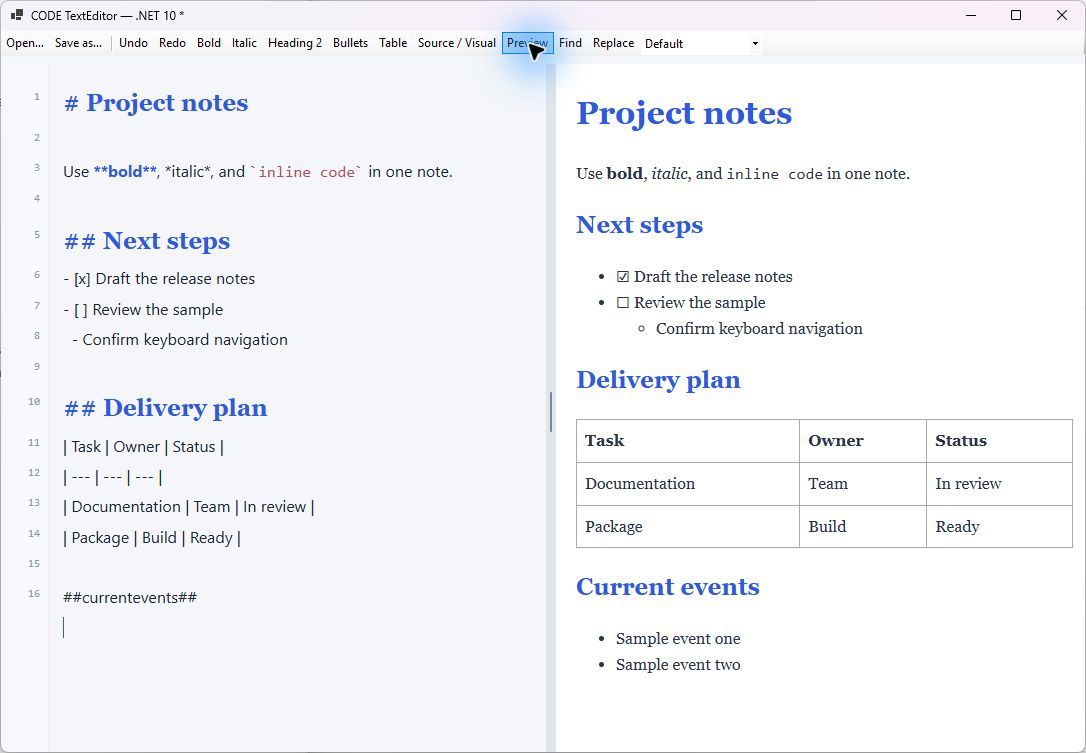
The WinForms sample shows Source mode on the left and the isolated preview on the right, separated by the resize divider. Its host-provided preview CSS uses a different font. The source still contains ##currentevents##, while the sample's PreviewRequested handler expands it into the Current events section on the right. This placeholder processing belongs to the sample host, not the editor core.
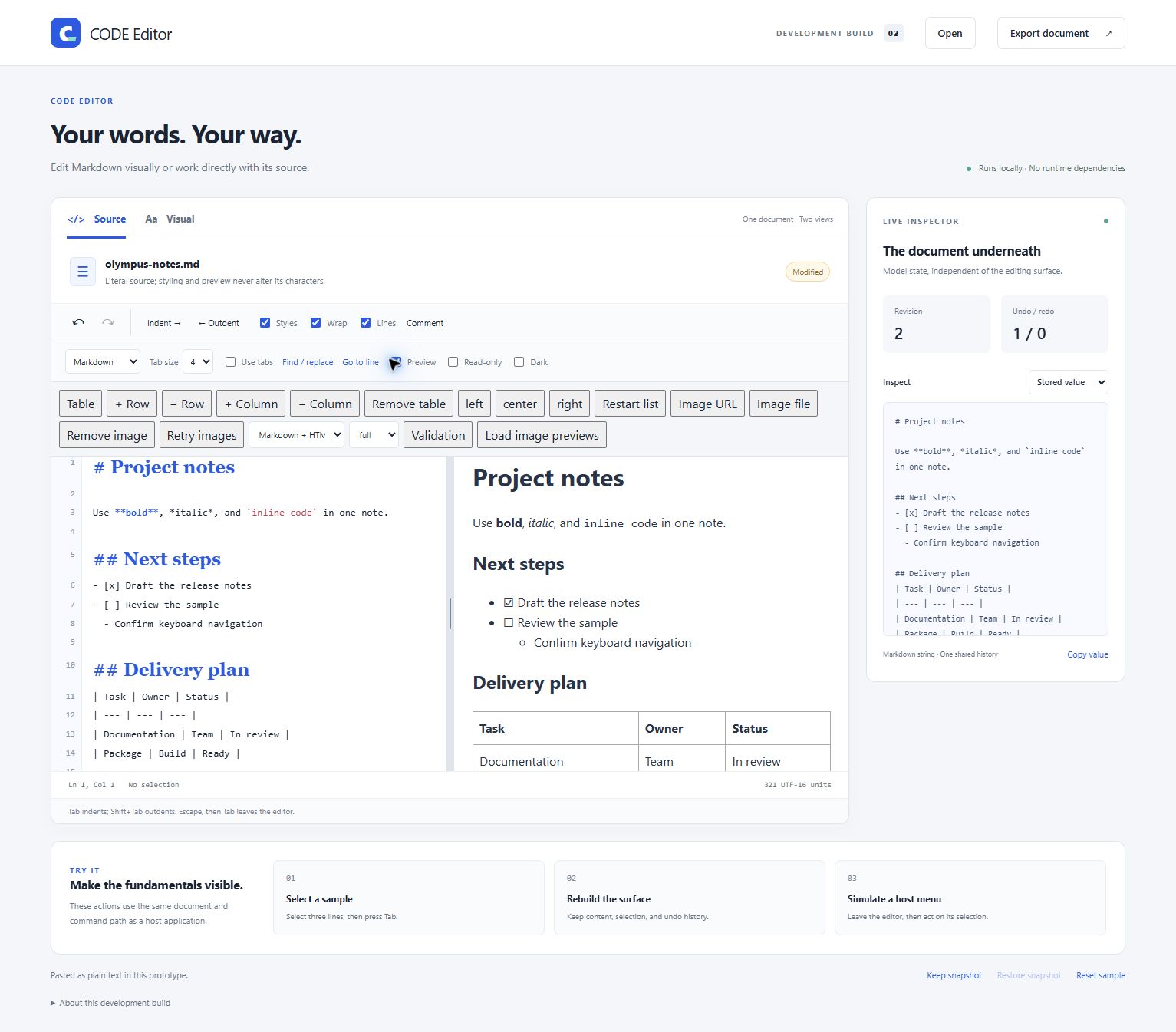
The browser sample uses the same source/preview split inside its editor workspace. The live inspector remains outside the split. This view shows the standard browser preview; the WinForms sample above additionally configures a host-specific placeholder handler and preview CSS.
How the built-in renderer works
The preview is produced locally in JavaScript. codecs.js parses the supported Markdown subset into a document model; documents.js produces HTML for that model. HTML storage uses the supported HTML importer. Plain text becomes escaped code-style content. No server call, external Markdown package, or browser Markdown facility is required.
preview.js manages the pipeline and iframe. A render is scheduled after relevant content/presentation changes, with a 100 ms debounce. It obtains the current serialized source, invokes the optional host hook, parses/serializes unless the host supplies finished HTML, and displays the result in an isolated iframe. Preview output never replaces the editor's stored source.
Two hook outcomes
| Outcome | Host supplies | Renderer then does |
|---|---|---|
| Preprocess source | Updated markdown / Markdown; handled remains false |
Built-in parsing and HTML generation |
| Supply complete preview HTML | html / Html plus handled: true / Handled = true |
Sanitizes host HTML and displays it; skips Markdown conversion |
The property is called Markdown for the primary use case, but format / Format must be checked: it contains the serialized input even for HTML or text storage. Returning HTML in Markdown without setting the handled result is not the full custom-renderer contract.
JavaScript preprocessing
editor.configure({
  onPreviewRequest(request) {
    if (request.format !== 'markdown') return;
    request.markdown = request.markdown.replaceAll(
      '##currentevents##',
      '- Architecture workshop\n- State of .NET'
    );
  }
});
editor.refreshPreview();
The callback may mutate the request or return an object. A returned object is merged into the request after the callback completes, so its fields take precedence. Returning a bare string is invalid. The request contains markdown, format, handled, html, sessionId, generation, revision, and an AbortSignal named signal.
For asynchronous rendering, return a Promise. renderBlogHtml below is your host/application function; pass the signal to any cancellable HTTP operation:
editor.configure({
  async onPreviewRequest(request) {
    if (request.format !== 'markdown') return;
    const html = await renderBlogHtml(request.markdown, request.signal);
    return { handled: true, html };
  }
});
editor.refreshPreview();
This permits an application-specific Markdown engine or an Olympus endpoint that expands placeholders and renders the exact publication format. It does not add that renderer as an editor dependency.
WinForms synchronous preprocessing
Register handlers before initialization where possible:
editor.PreviewRequested += (_, e) =>
{
    if (e.Format != EditorFormat.Markdown) return;
    e.Markdown = e.Markdown.Replace("##currentevents##",
        "- Architecture workshop\n- State of .NET",
        StringComparison.Ordinal);
};
editor.PreviewVisible = true;
The stored text retains ##currentevents##. Only the preview sees the replacement. Do not call SetEditorTextAsync from this handler to implement preview expansion; that would modify the user's document and could create a feedback loop.
WinForms asynchronous rendering
Assign a Task to e.Result synchronously. Do not use an async void event handler that changes e.Html after an await: the bridge will already have continued.
editor.PreviewRequested += (_, e) =>
{
    if (e.Format == EditorFormat.Markdown)
        e.Result = BuildPreviewAsync(e.Markdown, e.CancellationToken);
};

static async Task<PreviewRenderResult> BuildPreviewAsync(
    string markdown, CancellationToken cancellationToken)
{
    // Example asynchronous work; replace with your own service/query.
    await Task.Yield();
    cancellationToken.ThrowIfCancellationRequested();
    string expanded = markdown.Replace("##currentevents##",
        "- Architecture workshop\n- State of .NET",
        StringComparison.Ordinal);
    return new PreviewRenderResult(Markdown: expanded);
}
To bypass conversion after your own renderer has generated HTML:
editor.PreviewRequested += (_, e) =>
{
    e.Html = "<article class=\"blog-post\"><h1>Custom output</h1></article>";
    e.Handled = true;
};
Choose one composed preview handler rather than competing handlers assigning different Result tasks. If Result is assigned, its returned handled/HTML values control the async result; a null result Markdown falls back to the event's Markdown. A handled response requires a non-null HTML string, which may be empty.
Cancellation, errors and refreshing
A newer scheduled render, hidden preview, or destruction cancels an obsolete request. Session/generation/revision/view checks also prevent stale results from replacing newer output, even if host work ignores cancellation. Native preview processing uses a roughly 55-second cancellation deadline inside a 60-second bridge request window. Keep queries responsive and honor the provided token.
Exceptions raise previewError / PreviewError; the previously accepted preview remains. previewRendered / PreviewRendered signals that new HTML was accepted and assigned, not that every image/font has finished loading. refreshPreview() / RefreshPreviewAsync() reschedules rendering when external data changes without a document edit. It does not wait for completed rendering. Read getPreviewHtml() / GetPreviewHtmlAsync() after the rendered event if you need the last accepted HTML.
The returned HTML is preview body content, not a complete export of the publishing site. Default output may contain internal block anchors. Use the snapshot for document persistence and your publishing pipeline for final publication.
Preview-only CSS
editor.PreviewCss = """
    body { margin: 32px; font: 18px/1.7 Georgia, serif; color: #25344a; }
    .blog-post { max-width: 760px; margin-inline: auto; }
    h1, h2 { color: #185be9; }
    table { width: 100%; border-collapse: collapse; }
    th, td { border: 1px solid #ccd5e0; padding: 8px; }
    """;
JavaScript uses configure({ previewCss: cssText }). CSS is injected after the default preview styles inside the iframe. It does not restyle the editor or change stored Markdown/HTML. Host HTML can retain semantic containers, classes and IDs for publication-style selectors. Supply stylesheet text, not an HTML <style> element or a URL.
Preview CSS is constrained by CSP. Remote stylesheets, @import resources, scripts, and remote webfonts are not generally enabled. Locally available fonts can be named. Images obey the image-origin policy. An embedded URL does not gain permission merely because it appears in CSS.
Safety and links
Custom HTML still passes the preview sanitizer. Active content such as scripts, frames, forms, SVG, embedded media, and stylesheet tags is removed. Safe semantic containers and selected attributes remain; event-handler attributes do not. This renderer is not intended as a general-purpose sanitizer for arbitrary content outside its iframe/CSP environment.
The iframe permits parent DOM access for measurement but does not permit scripts. Navigation/click behavior is suppressed. A preview is a rendered document, not an interactive hosted website.
Scrolling and resizing
The normal unchanged-document path places block anchors in preview HTML. It maps source/model positions to measured preview positions so both mouse scrolling and caret movement follow the same segment. Images and layout changes trigger remeasurement. Following is one-way, editor to preview.
Preprocessing that changes the source, or a handled HTML response, has no reliable source map. Those paths use proportional scrolling. Do not promise exact line alignment for expanded event lists or a radically different custom layout.
The divider supports pointer dragging, arrows (2% steps), Shift+arrows (10%), Home/End, and Enter/double-click to reset to 50%. The configured ratio is normally bounded to 20–80%, with minimum pane sizes narrowing it for small containers. Below 600 px container width the panes stack and the divider becomes horizontal. PreviewSync = false disables following without disabling resizing.